Entra ID Deviceless Windows Hello Sign-in Followed by Device Registration
Identifies a Microsoft Entra ID device registration by the same user within 15 minutes of a phishing-resistant, device-bound credential (Windows Hello for Business, FIDO2 security key, or passkey) signing in with no device identifier. In the "borrowing Windows Hello keys" technique, an adversary reuses a WHfB/NGC key or passkey away from its bound device to mint device-agnostic tokens, then uses those tokens to register an attacker-controlled device and obtain a Primary Refresh Token (PRT) for long-lived persistence. Timing is taken from the authentication step on the sign-in, not the sign-in document timestamp, because Entra can emit the sign-in record after the Register device audit event. This chain is distinct from device-code-flow phishing kits.
Elastic rule (View on GitHub)
  1[metadata]
  2creation_date = "2026/08/07"
  3integration = ["azure"]
  4maturity = "production"
  5min_stack_comments = "FIELD_EXTRACT for flattened fields requires 9.5.0"
  6min_stack_version = "9.5.0"
  7updated_date = "2026/09/18"
  8
  9[rule]
 10author = ["Elastic"]
 11description = """
 12Identifies a Microsoft Entra ID device registration by the same user within 15 minutes of a phishing-resistant,
 13device-bound credential (Windows Hello for Business, FIDO2 security key, or passkey) signing in with no device
 14identifier. In the "borrowing Windows Hello keys" technique, an adversary reuses a WHfB/NGC key or passkey away from its
 15bound device to mint device-agnostic tokens, then uses those tokens to register an attacker-controlled device and obtain
 16a Primary Refresh Token (PRT) for long-lived persistence. Timing is taken from the authentication step on the sign-in,
 17not the sign-in document timestamp, because Entra can emit the sign-in record after the Register device audit event.
 18This chain is distinct from device-code-flow phishing kits.
 19"""
 20false_positives = [
 21    """
 22    A user completing initial passwordless enrollment and registering their first device in the same session can match.
 23    Validate against expected onboarding and the device's provenance (managed/compliant, expected name, expected
 24    source).
 25    """,
 26    """
 27    Authorized red team or research engagements that borrow a WHfB/passkey and register a device will match. Document
 28    the engagement and add scoped exceptions for the involved principals or source addresses.
 29    """,
 30]
 31from = "now-30m"
 32interval = "10m"
 33language = "esql"
 34license = "Elastic License v2"
 35name = "Entra ID Deviceless Windows Hello Sign-in Followed by Device Registration"
 36note = """## Triage and analysis
 37
 38### Investigating Entra ID Deviceless Windows Hello Sign-in Followed by Device Registration
 39
 40This rule correlates, within 15 minutes for the same user: (1) a successful member sign-in satisfied by a device-bound credential (WHfB, FIDO2, or passkey) with an empty `device_detail.device_id`, and (2) a successful device registration (`Register device`, `Add registered owner to device`, or `Add device`). The alert is the sign-in document enriched with the matching registration. `Esql.signin_time` is the authentication step time from flattened `authentication_details` (falling back to `@timestamp`); use it and `Esql.signin_to_register_s` for sequencing, since Entra can write the sign-in record after the `Register device` audit event, making `@timestamp` unreliable for ordering.
 41
 42This is the escalation step of the "borrowing Windows Hello keys" technique: an adversary mints a device-agnostic token from a deviceless WHfB/passkey assertion, then immediately registers an attacker-controlled device to obtain a Primary Refresh Token that survives `revokeSignInSessions` and password resets.
 43
 44### Possible investigation steps
 45
 46- Identify the user (`user_principal_name` / `Esql.actor_user_id`) and confirm `Esql.auth_method` is WHfB/FIDO2/passkey with an empty `device_detail.device_id` and `cross_tenant_access_type` of `none` - a device-bound method presenting without its device is the first-stage signal.
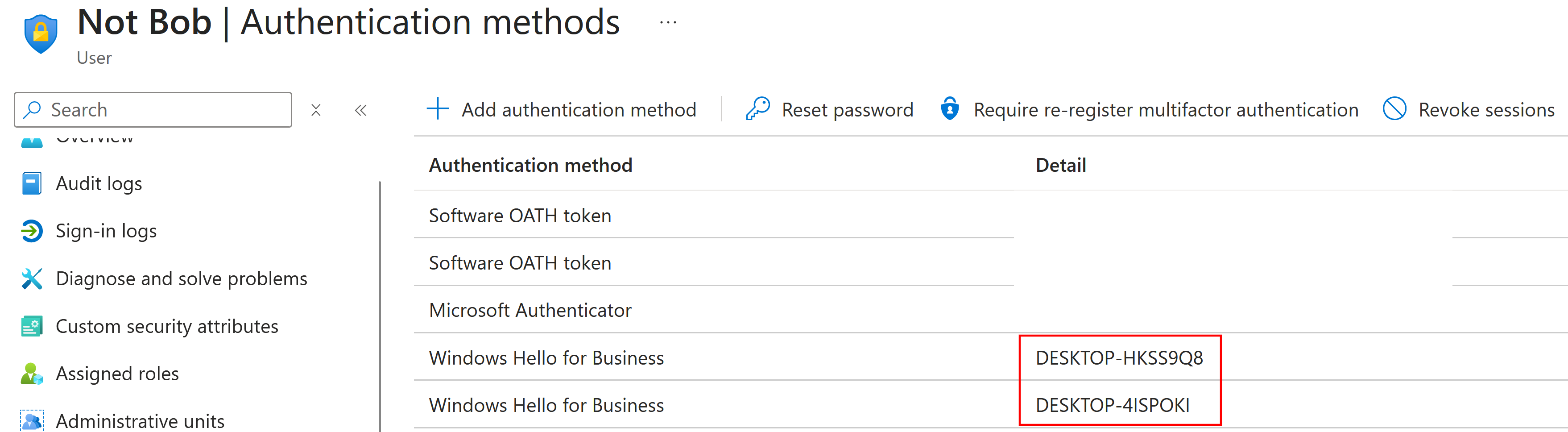
 47- Compare `Esql.signin_time` to `Esql.register_time` via `Esql.signin_to_register_s`; a gap of seconds to minutes is the expected attacker cadence. `Esql.registered_device_name`/`Esql.register_operation` for tooling-registered devices are often generic (`DESKTOP-*`) and absent from inventory/unmanaged.
 48- Check `app_display_name`/`resource_display_name` for non-interactive clients (Azure CLI, ROADtools/roadtx) against Graph or the Device Registration Service, `source.address`/`source.geo.country_name`/`user_agent.original` for hosting/VPS or automation, and pivot on `Esql.actor_user_id` for a follow-on `primaryRefreshToken` `incoming_token_type` from the new device or an `Add Windows Hello for Business credential` event (backdoor enrollment).
 49
 50### False positive analysis
 51
 52- Initial passwordless onboarding can produce a sign-in and first device registration in the same session; validate the device against inventory and confirm it is managed/compliant and named as expected.
 53- Authorized security assessments that replay a key and register a device will also match; document the engagement and add scoped exceptions.
 54
 55### Response and remediation
 56
 57- Remove the rogue device BEFORE revoking sessions (`GET /v1.0/users/{id}/registeredDevices` and `/ownedDevices`, then `DELETE /v1.0/devices/{deviceObjectId}` for unrecognized devices) - a device-bound PRT survives `revokeSignInSessions`, and a device left in place re-establishes access.
 58- Treat the key/passkey as compromised: delete the affected authentication methods, revoke refresh tokens and sessions (`POST /v1.0/users/{id}/revokeSignInSessions`), reset credentials, and re-enroll from a trusted device.
 59- Hunt for additional persistence in the same window (attacker-registered MFA methods, extra device registrations, PRT use from the new device), and restrict device registration/join via Conditional Access requiring a compliant device.
 60"""
 61references = [
 62    "https://dirkjanm.io/borrowing-windows-hello-keys/",
 63    "https://dirkjanm.io/phishing-for-microsoft-entra-primary-refresh-tokens/",
 64]
 65risk_score = 73
 66rule_id = "62848597-595c-4cc3-8d24-6c47a5fee9a9"
 67setup = """#### Required Microsoft Entra ID Sign-In and Audit Logs
 68This rule requires the Azure integration with Microsoft Entra ID Sign-In logs and Audit logs enabled and collected via Azure Event Hub. Both data streams are required: the sign-in supplies the deviceless WHfB/passkey assertion, and the audit log supplies the follow-on device registration.
 69"""
 70severity = "high"
 71tags = [
 72    "Domain: Cloud",
 73    "Domain: Identity",
 74    "Platform: Entra ID",
 75    "Use Case: Threat Detection",
 76    "Tactic: Persistence",
 77    "Tactic: Defense Evasion",
 78    "Rule Type: ES|QL",
 79    "Data Source: Azure",
 80    "Data Source: Microsoft Entra ID",
 81    "Data Source: Microsoft Entra ID Sign-In Logs",
 82    "Data Source: Microsoft Entra ID Audit Logs",
 83    "Resources: Investigation Guide",
 84]
 85timestamp_override = "event.ingested"
 86type = "esql"
 87
 88query = '''
 89FROM logs-azure.signinlogs-*, logs-azure.auditlogs-* METADATA _id, _version, _index
 90| WHERE
 91    (
 92      azure.signinlogs.result_signature == "SUCCESS" AND
 93      azure.signinlogs.properties.user_type == "Member" AND
 94      azure.signinlogs.properties.user_id IS NOT NULL AND
 95      azure.signinlogs.properties.cross_tenant_access_type == "none" AND
 96      (
 97        azure.signinlogs.properties.device_detail.device_id IS NULL OR
 98        azure.signinlogs.properties.device_detail.device_id == ""
 99      )
100    ) OR
101    (
102      azure.auditlogs.operation_name IN ("Register device", "Add registered owner to device", "Add device") AND
103      event.outcome == "success" AND
104      azure.auditlogs.properties.initiated_by.user.id IS NOT NULL
105    )
106| EVAL
107    Esql.sequence_stage = CASE(data_stream.dataset == "azure.signinlogs", "signin", "register"),
108    Esql.actor_user_id = COALESCE(azure.signinlogs.properties.user_id, azure.auditlogs.properties.initiated_by.user.id),
109    Esql.auth_method = FIELD_EXTRACT(azure.signinlogs.properties.authentication_details, "authentication_method"),
110    Esql.auth_step_time = MV_MIN(TO_DATETIME(FIELD_EXTRACT(azure.signinlogs.properties.authentication_details, "authentication_step_date_time"))),
111    Esql.register_candidate = CASE(
112      data_stream.dataset == "azure.auditlogs",
113      CONCAT(
114        TO_STRING(@timestamp),
115        "|",
116        COALESCE(`azure.auditlogs.properties.target_resources.0.display_name`, ""),
117        "|",
118        azure.auditlogs.operation_name
119      ),
120      null
121    )
122| EVAL Esql.signin_time = COALESCE(Esql.auth_step_time, @timestamp)
123| WHERE
124    Esql.sequence_stage == "register" OR
125    (
126      MV_COUNT(Esql.auth_method) == 1 AND
127      (
128        Esql.auth_method == "Windows Hello for Business" OR
129        TO_LOWER(Esql.auth_method) LIKE "fido2*" OR
130        TO_LOWER(Esql.auth_method) LIKE "*passkey*"
131      )
132    )
133| KEEP
134    @timestamp,
135    Esql.signin_time,
136    Esql.actor_user_id,
137    Esql.sequence_stage,
138    Esql.auth_method,
139    Esql.register_candidate,
140    azure.signinlogs.properties.user_id,
141    azure.signinlogs.properties.user_principal_name,
142    azure.signinlogs.properties.device_detail.device_id,
143    azure.signinlogs.properties.device_detail.is_managed,
144    azure.signinlogs.properties.cross_tenant_access_type,
145    azure.signinlogs.properties.app_id,
146    azure.signinlogs.properties.app_display_name,
147    azure.signinlogs.properties.resource_display_name,
148    azure.signinlogs.properties.incoming_token_type,
149    source.address,
150    source.geo.country_name,
151    user_agent.original,
152    _id,
153    _version,
154    _index
155| WHERE Esql.actor_user_id IS NOT NULL
156| INLINE STATS
157    Esql.register_count = COUNT(*) WHERE Esql.sequence_stage == "register",
158    Esql.register_candidates = VALUES(Esql.register_candidate) WHERE Esql.sequence_stage == "register"
159  BY Esql.actor_user_id
160| DROP Esql.register_candidate
161| WHERE Esql.sequence_stage == "signin" AND Esql.register_count > 0
162| MV_EXPAND Esql.register_candidates
163| EVAL
164    Esql.register_time = TO_DATETIME(MV_FIRST(SPLIT(Esql.register_candidates, "|"))),
165    Esql.registered_device_name = MV_SLICE(SPLIT(Esql.register_candidates, "|"), 1, 1),
166    Esql.register_operation = MV_LAST(SPLIT(Esql.register_candidates, "|")),
167    Esql.signin_to_register_s = DATE_DIFF("second", Esql.signin_time, Esql.register_time)
168| DROP Esql.register_candidates, Esql.sequence_stage, Esql.register_count
169| WHERE
170    Esql.signin_to_register_s >= 0 AND
171    Esql.signin_to_register_s <= 900
172| SORT Esql.register_time ASC, Esql.signin_to_register_s ASC, _id ASC
173| LIMIT 1 BY Esql.actor_user_id
174'''
175
176
177[[rule.threat]]
178framework = "MITRE ATT&CK"
179[[rule.threat.technique]]
180id = "T1098"
181name = "Account Manipulation"
182reference = "https://attack.mitre.org/techniques/T1098/"
183[[rule.threat.technique.subtechnique]]
184id = "T1098.005"
185name = "Device Registration"
186reference = "https://attack.mitre.org/techniques/T1098/005/"
187
188
189
190[rule.threat.tactic]
191id = "TA0003"
192name = "Persistence"
193reference = "https://attack.mitre.org/tactics/TA0003/"
194[[rule.threat]]
195framework = "MITRE ATT&CK"
196[[rule.threat.technique]]
197id = "T1550"
198name = "Use Alternate Authentication Material"
199reference = "https://attack.mitre.org/techniques/T1550/"
200
201
202[rule.threat.tactic]
203id = "TA0005"
204name = "Defense Evasion"
205reference = "https://attack.mitre.org/tactics/TA0005/"
Triage and analysis
Investigating Entra ID Deviceless Windows Hello Sign-in Followed by Device Registration
This rule correlates, within 15 minutes for the same user: (1) a successful member sign-in satisfied by a device-bound credential (WHfB, FIDO2, or passkey) with an empty device_detail.device_id, and (2) a successful device registration (Register device, Add registered owner to device, or Add device). The alert is the sign-in document enriched with the matching registration. Esql.signin_time is the authentication step time from flattened authentication_details (falling back to @timestamp); use it and Esql.signin_to_register_s for sequencing, since Entra can write the sign-in record after the Register device audit event, making @timestamp unreliable for ordering.
This is the escalation step of the "borrowing Windows Hello keys" technique: an adversary mints a device-agnostic token from a deviceless WHfB/passkey assertion, then immediately registers an attacker-controlled device to obtain a Primary Refresh Token that survives revokeSignInSessions and password resets.
Possible investigation steps
- Identify the user (
user_principal_name/Esql.actor_user_id) and confirmEsql.auth_methodis WHfB/FIDO2/passkey with an emptydevice_detail.device_idandcross_tenant_access_typeofnone- a device-bound method presenting without its device is the first-stage signal. - Compare
Esql.signin_timetoEsql.register_timeviaEsql.signin_to_register_s; a gap of seconds to minutes is the expected attacker cadence.Esql.registered_device_name/Esql.register_operationfor tooling-registered devices are often generic (DESKTOP-*) and absent from inventory/unmanaged. - Check
app_display_name/resource_display_namefor non-interactive clients (Azure CLI, ROADtools/roadtx) against Graph or the Device Registration Service,source.address/source.geo.country_name/user_agent.originalfor hosting/VPS or automation, and pivot onEsql.actor_user_idfor a follow-onprimaryRefreshTokenincoming_token_typefrom the new device or anAdd Windows Hello for Business credentialevent (backdoor enrollment).
False positive analysis
- Initial passwordless onboarding can produce a sign-in and first device registration in the same session; validate the device against inventory and confirm it is managed/compliant and named as expected.
- Authorized security assessments that replay a key and register a device will also match; document the engagement and add scoped exceptions.
Response and remediation
- Remove the rogue device BEFORE revoking sessions (
GET /v1.0/users/{id}/registeredDevicesand/ownedDevices, thenDELETE /v1.0/devices/{deviceObjectId}for unrecognized devices) - a device-bound PRT survivesrevokeSignInSessions, and a device left in place re-establishes access. - Treat the key/passkey as compromised: delete the affected authentication methods, revoke refresh tokens and sessions (
POST /v1.0/users/{id}/revokeSignInSessions), reset credentials, and re-enroll from a trusted device. - Hunt for additional persistence in the same window (attacker-registered MFA methods, extra device registrations, PRT use from the new device), and restrict device registration/join via Conditional Access requiring a compliant device.
References
-
Most research into Windows Hello focuses on the mechanics in use when authenticating to the local device. As an Entra ID researcher, I’ve always been more interested in how these keys are used to authenticate to the cloud. I’ve given several talks on Windows Hello for Business (WHFB for short) and about the many implementation flaws discovered in the process, most of which were fixed by Microsoft. For this blog I want to focus on a technique that was left as-is since it is more or less a consequence of how WHFB works: the ability to perform single-sign on with the backing cryptographic keys from a user session, without needing the PIN or other information/user presence. We will not just look at how we can utilize this to request Primary Refresh Tokens (PRTs), but also how we can use this to perform device registration by using the WHFB key as a FIDO key/passkey.
Read More -

In Microsoft Entra ID (formerly Azure AD, in this blog referred to as “Azure AD”), there are different types of OAuth tokens. The most powerful token is a Primary Refresh Token, which is linked to a user’s device and can be used to sign in to any Entra ID connected application and web site. In phishing scenarios, especially those that abuse legit OAuth flows such as device code phishing, the resulting tokens are often less powerful tokens that are limited in scope or usage methods. In this blog, I will describe new techniques to phish directly for Primary Refresh Tokens, and in some scenarios also deploy passwordless credentials that comply with even the strictest MFA policies.
Read More
Related rules
- Entra ID AiTM Phishing-Kit Chain Detected
- Entra ID Multiple Device Registrations by a Single User
- Entra ID OAuth User Impersonation to Microsoft Graph
- Entra ID Conditional Access MFA Bypass with Unusual User, Client and Source ASN
- Entra ID Device Registration with Phishing Kit Default OS Build