Entra ID Multiple Device Registrations by a Single User
Detects multiple Microsoft Entra ID device registrations by a single user, where three or more distinct devices are registered within a 15-minute window. A legitimate user enrolling a device produces a single "Register device" event; registering multiple distinct devices in quick succession is uncommon and is the fingerprint behavior of adversary-in-the-middle (AiTM) phishing kits and stolen-token replay tooling (for example Kali365), which mint a new Azure AD-joined device, and therefore a new Primary Refresh Token (PRT), per relay or replay attempt. Each registered device is a separate certificate-bound principal whose PRT survives user-level session revocation and password resets, so multiple registrations on a single low-privilege identity establish device-bound persistence at scale.
Elastic rule (View on GitHub)
  1[metadata]
  2creation_date = "2026/06/26"
  3integration = ["azure"]
  4maturity = "production"
  5updated_date = "2026/09/18"
  6
  7[rule]
  8author = ["Elastic"]
  9description = """
 10Detects multiple Microsoft Entra ID device registrations by a single user, where three or more distinct devices are
 11registered within a 15-minute window. A legitimate user enrolling a device produces a single "Register device" event;
 12registering multiple distinct devices in quick succession is uncommon and is the fingerprint behavior of
 13adversary-in-the-middle (AiTM) phishing kits and stolen-token replay tooling (for example Kali365), which mint a new
 14Azure AD-joined device, and therefore a new Primary Refresh Token (PRT), per relay or replay attempt. Each registered
 15device is a separate certificate-bound principal whose PRT survives user-level session revocation and password resets,
 16so multiple registrations on a single low-privilege identity establish device-bound persistence at scale.
 17"""
 18false_positives = [
 19    """
 20    A user legitimately enrolling several devices in a short window (for example, a new laptop and phone during
 21    onboarding, or re-registering a device after a wipe) can produce three or more registrations. Validate against the
 22    user's device inventory and onboarding activity, and consider raising the threshold or tightening the window if
 23    benign multi-device enrollment is common in the environment.
 24    """,
 25    """
 26    Bulk provisioning workflows, autopilot/MDM rollouts, or device-management tooling that registers devices on behalf
 27    of users may generate multiple registrations across many users at once. Suppress during planned rollout windows.
 28    """,
 29]
 30from = "now-30m"
 31language = "esql"
 32license = "Elastic License v2"
 33name = "Entra ID Multiple Device Registrations by a Single User"
 34note = """## Triage and analysis
 35
 36### Investigating Entra ID Multiple Device Registrations by a Single User
 37
 38A single Entra ID "Register device" event is routine: a user enrolling one device emits one registration. Concentrating three or more distinct device registrations onto one user inside a 15-minute window is uncommon for legitimate activity and is the fingerprint of either:
 39
 40- An AiTM phishing-kit relay session that, after capturing the victim's sign-in, registers one or more Azure AD-joined devices of its own from the kit infrastructure within minutes (observed cadence of roughly one device every 2-6 minutes, e.g. Kali365 registering five devices in ~12 minutes).
 41- Token-replay tooling driving multiple device joins in quick succession off a stolen refresh token or PRT.
 42
 43Each registered device is a separate principal with its own certificate-bound PRT. Because user-level controls (`revokeSignInSessions`, password reset) do not invalidate device-bound PRTs, every device left in place is an independent, persistent foothold.
 44
 45### Possible investigation steps
 46
 47- Identify the user (`azure.auditlogs.properties.initiated_by.user.userPrincipalName`) and review the registered devices in `Esql.device_name_values`. Tool-driven joins frequently use default Windows-style names such as `DESKTOP-<6 alphanumeric>` and a homogeneous, hardcoded OS build.
 48- Inspect `Esql.user_agent_values` from the `Register device` events. A spoofed Windows device-registration client string (`Dsreg/10.0 (Windows <build>)`) or a raw HTTP client (`axios/*`, `python-requests/*`, `Microsoft.OData.Client/*`) instead of a genuine browser/endpoint user agent is high-fidelity tooling.
 49- Pivot to the paired `Add device` events for each device (correlate via `azure.correlation_id`) and review the modified properties: `DeviceOSType`, `DeviceOSVersion`/`CloudDeviceOSVersion`, and `DeviceTrustType`. A `DeviceTrustType` of `AzureAd` (full join) on a low-privilege user, and an identical hardcoded OS build across all devices in the window, are strong indicators.
 50- Review the origin surfaced on the alert: `Esql.source_ip_values`, `Esql.source_as_number_values`, `Esql.source_as_organization_values`, and `Esql.source_country_values`/`Esql.source_city_values`/`Esql.source_region_values`. Hosting/VPS ASNs (for example Tencent, Alibaba, or other cloud providers) and unexpected geographies for a device-registration event are high-fidelity suspicious. A single source IP/ASN across every registration in the window is consistent with one piece of kit infrastructure driving the joins.
 51- Cross-reference `logs-azure.signinlogs-*` for the same user around the registration window. The registrations are brokered through the `Microsoft Authentication Broker` application against the `Device Registration Service` resource; confirm whether the broker was subsequently used to mint tokens for other resources (for example Microsoft Graph) from the same source.
 52- Cross-reference `logs-azure.auditlogs-*` for a security-info / MFA method registration (`User registered security info`) by the same user near the registration window; AiTM kits commonly plant their own MFA method alongside the device persistence.
 53- Confirm with the user whether they performed a multi-device enrollment or onboarding action during the window.
 54
 55### False positive analysis
 56
 57- New-device or onboarding flows where a user enrolls three or more devices in a short window can fire. Validate against the user's known device inventory and any onboarding or device-refresh events.
 58- Bulk provisioning, autopilot, or MDM rollouts can register multiple devices per user concurrently. Consider suppression during planned rollouts.
 59- If benign multi-device enrollment is routine in the environment, raise the distinct-device threshold or shorten the window.
 60
 61### Response and remediation
 62
 63- Treat as likely AiTM compromise or token replay until proven otherwise. Remove the rogue device registrations BEFORE revoking sessions, because device-bound PRTs survive `revokeSignInSessions` and a device left in place re-establishes access.
 64    - `GET /v1.0/users/{id}/registeredDevices` and `/ownedDevices`, then `DELETE /v1.0/devices/{deviceObjectId}` for each unrecognized device in the window.
 65- Revoke refresh tokens and sessions, then reset credentials and re-register MFA.
 66    - `POST /v1.0/users/{id}/revokeSignInSessions`.
 67- Temporarily disable the account if activity must be halted during investigation.
 68    - `PATCH /v1.0/users/{id}` with body `{"accountEnabled": false}`.
 69- Remove other attacker persistence established alongside the device joins: attacker-registered MFA methods, malicious inbox/forwarding rules, and OAuth consents.
 70- Hunt for the same device-name pattern, OS build, and registration user agent across other users and tenants, and apply Conditional Access to restrict device registration (require a compliant/managed device or trusted network).
 71"""
 72references = [
 73    "https://any.run/malware-trends/kali365/",
 74    "https://www.huntress.com/blog/kali365-device-code-phishing-kit",
 75    "https://www.ic3.gov/PSA/2026/PSA260521",
 76    "https://arcticwolf.com/resources/blog/token-bingo-dont-let-your-code-be-the-winner/"
 77]
 78risk_score = 47
 79rule_id = "960b1cef-f94d-4150-863d-b1dc311739de"
 80severity = "medium"
 81tags = [
 82    "Domain: Cloud",
 83    "Domain: Identity",
 84    "Data Source: Azure",
 85    "Data Source: Microsoft Entra ID",
 86    "Data Source: Microsoft Entra ID Audit Logs",
 87    "Use Case: Identity and Access Audit",
 88    "Use Case: Threat Detection",
 89    "Tactic: Persistence",
 90    "Tactic: Initial Access",
 91    "Tactic: Credential Access",
 92    "Resources: Investigation Guide",
 93    "Noise: Unknown",
 94    "Performance: Normal",
 95    "Rule Type: ES|QL",
 96    "Platform: Entra ID",
 97]
 98timestamp_override = "event.ingested"
 99type = "esql"
100
101query = '''
102from logs-azure.auditlogs-*
103| where data_stream.dataset == "azure.auditlogs"
104    and azure.auditlogs.operation_name == "Register device"
105    and azure.auditlogs.properties.initiated_by.user.userPrincipalName is not null
106    // For "Register device" the registered device is the primary target resource (index 0);
107    // target_resources is a numeric-indexed object array in this integration, so wildcard/name-based matching is not available.
108    and `azure.auditlogs.properties.target_resources.0.display_name` is not null
109
110| eval Esql.bucket_window = date_trunc(15 minutes, @timestamp)
111
112| stats
113    Esql.count_distinct_devices = count_distinct(`azure.auditlogs.properties.target_resources.0.display_name`),
114    Esql.device_name_values = values(`azure.auditlogs.properties.target_resources.0.display_name`),
115    Esql.user_agent_values = values(azure.auditlogs.properties.userAgent),
116    Esql.source_ip_values = values(source.ip),
117    Esql.source_as_number_values = values(source.`as`.number),
118    Esql.source_as_organization_values = values(source.`as`.organization.name),
119    Esql.source_country_values = values(source.geo.country_name),
120    Esql.source_city_values = values(source.geo.city_name),
121    Esql.source_region_values = values(source.geo.region_name),
122    Esql.correlation_id_values = values(azure.correlation_id),
123    Esql.timestamp_first_seen = min(@timestamp),
124    Esql.timestamp_last_seen = max(@timestamp),
125    Esql.event_count = count(*)
126    by azure.auditlogs.properties.initiated_by.user.userPrincipalName, Esql.bucket_window
127
128| where Esql.count_distinct_devices >= 3
129
130| keep azure.auditlogs.properties.initiated_by.user.userPrincipalName, Esql.*
131'''
132
133
134[[rule.threat]]
135framework = "MITRE ATT&CK"
136[[rule.threat.technique]]
137id = "T1098"
138name = "Account Manipulation"
139reference = "https://attack.mitre.org/techniques/T1098/"
140[[rule.threat.technique.subtechnique]]
141id = "T1098.005"
142name = "Device Registration"
143reference = "https://attack.mitre.org/techniques/T1098/005/"
144
145
146
147[rule.threat.tactic]
148id = "TA0003"
149name = "Persistence"
150reference = "https://attack.mitre.org/tactics/TA0003/"
151[[rule.threat]]
152framework = "MITRE ATT&CK"
153[[rule.threat.technique]]
154id = "T1078"
155name = "Valid Accounts"
156reference = "https://attack.mitre.org/techniques/T1078/"
157[[rule.threat.technique.subtechnique]]
158id = "T1078.004"
159name = "Cloud Accounts"
160reference = "https://attack.mitre.org/techniques/T1078/004/"
161
162
163
164[rule.threat.tactic]
165id = "TA0001"
166name = "Initial Access"
167reference = "https://attack.mitre.org/tactics/TA0001/"
168[[rule.threat]]
169framework = "MITRE ATT&CK"
170[[rule.threat.technique]]
171id = "T1557"
172name = "Adversary-in-the-Middle"
173reference = "https://attack.mitre.org/techniques/T1557/"
174
175
176[rule.threat.tactic]
177id = "TA0006"
178name = "Credential Access"
179reference = "https://attack.mitre.org/tactics/TA0006/"
180
181[rule.investigation_fields]
182field_names = [
183    "azure.auditlogs.properties.initiated_by.user.userPrincipalName",
184    "Esql.count_distinct_devices",
185    "Esql.device_name_values",
186    "Esql.user_agent_values",
187    "Esql.source_ip_values",
188    "Esql.source_as_organization_values",
189]
Triage and analysis
Investigating Entra ID Multiple Device Registrations by a Single User
A single Entra ID "Register device" event is routine: a user enrolling one device emits one registration. Concentrating three or more distinct device registrations onto one user inside a 15-minute window is uncommon for legitimate activity and is the fingerprint of either:
- An AiTM phishing-kit relay session that, after capturing the victim's sign-in, registers one or more Azure AD-joined devices of its own from the kit infrastructure within minutes (observed cadence of roughly one device every 2-6 minutes, e.g. Kali365 registering five devices in ~12 minutes).
- Token-replay tooling driving multiple device joins in quick succession off a stolen refresh token or PRT.
Each registered device is a separate principal with its own certificate-bound PRT. Because user-level controls (revokeSignInSessions, password reset) do not invalidate device-bound PRTs, every device left in place is an independent, persistent foothold.
Possible investigation steps
- Identify the user (
azure.auditlogs.properties.initiated_by.user.userPrincipalName) and review the registered devices inEsql.device_name_values. Tool-driven joins frequently use default Windows-style names such asDESKTOP-<6 alphanumeric>and a homogeneous, hardcoded OS build. - Inspect
Esql.user_agent_valuesfrom theRegister deviceevents. A spoofed Windows device-registration client string (Dsreg/10.0 (Windows <build>)) or a raw HTTP client (axios/*,python-requests/*,Microsoft.OData.Client/*) instead of a genuine browser/endpoint user agent is high-fidelity tooling. - Pivot to the paired
Add deviceevents for each device (correlate viaazure.correlation_id) and review the modified properties:DeviceOSType,DeviceOSVersion/CloudDeviceOSVersion, andDeviceTrustType. ADeviceTrustTypeofAzureAd(full join) on a low-privilege user, and an identical hardcoded OS build across all devices in the window, are strong indicators. - Review the origin surfaced on the alert:
Esql.source_ip_values,Esql.source_as_number_values,Esql.source_as_organization_values, andEsql.source_country_values/Esql.source_city_values/Esql.source_region_values. Hosting/VPS ASNs (for example Tencent, Alibaba, or other cloud providers) and unexpected geographies for a device-registration event are high-fidelity suspicious. A single source IP/ASN across every registration in the window is consistent with one piece of kit infrastructure driving the joins. - Cross-reference
logs-azure.signinlogs-*for the same user around the registration window. The registrations are brokered through theMicrosoft Authentication Brokerapplication against theDevice Registration Serviceresource; confirm whether the broker was subsequently used to mint tokens for other resources (for example Microsoft Graph) from the same source. - Cross-reference
logs-azure.auditlogs-*for a security-info / MFA method registration (User registered security info) by the same user near the registration window; AiTM kits commonly plant their own MFA method alongside the device persistence. - Confirm with the user whether they performed a multi-device enrollment or onboarding action during the window.
False positive analysis
- New-device or onboarding flows where a user enrolls three or more devices in a short window can fire. Validate against the user's known device inventory and any onboarding or device-refresh events.
- Bulk provisioning, autopilot, or MDM rollouts can register multiple devices per user concurrently. Consider suppression during planned rollouts.
- If benign multi-device enrollment is routine in the environment, raise the distinct-device threshold or shorten the window.
Response and remediation
- Treat as likely AiTM compromise or token replay until proven otherwise. Remove the rogue device registrations BEFORE revoking sessions, because device-bound PRTs survive
revokeSignInSessionsand a device left in place re-establishes access.GET /v1.0/users/{id}/registeredDevicesand/ownedDevices, thenDELETE /v1.0/devices/{deviceObjectId}for each unrecognized device in the window.
- Revoke refresh tokens and sessions, then reset credentials and re-register MFA.
POST /v1.0/users/{id}/revokeSignInSessions.
- Temporarily disable the account if activity must be halted during investigation.
PATCH /v1.0/users/{id}with body{"accountEnabled": false}.
- Remove other attacker persistence established alongside the device joins: attacker-registered MFA methods, malicious inbox/forwarding rules, and OAuth consents.
- Hunt for the same device-name pattern, OS build, and registration user agent across other users and tenants, and apply Conditional Access to restrict device registration (require a compliant/managed device or trusted network).
References
-
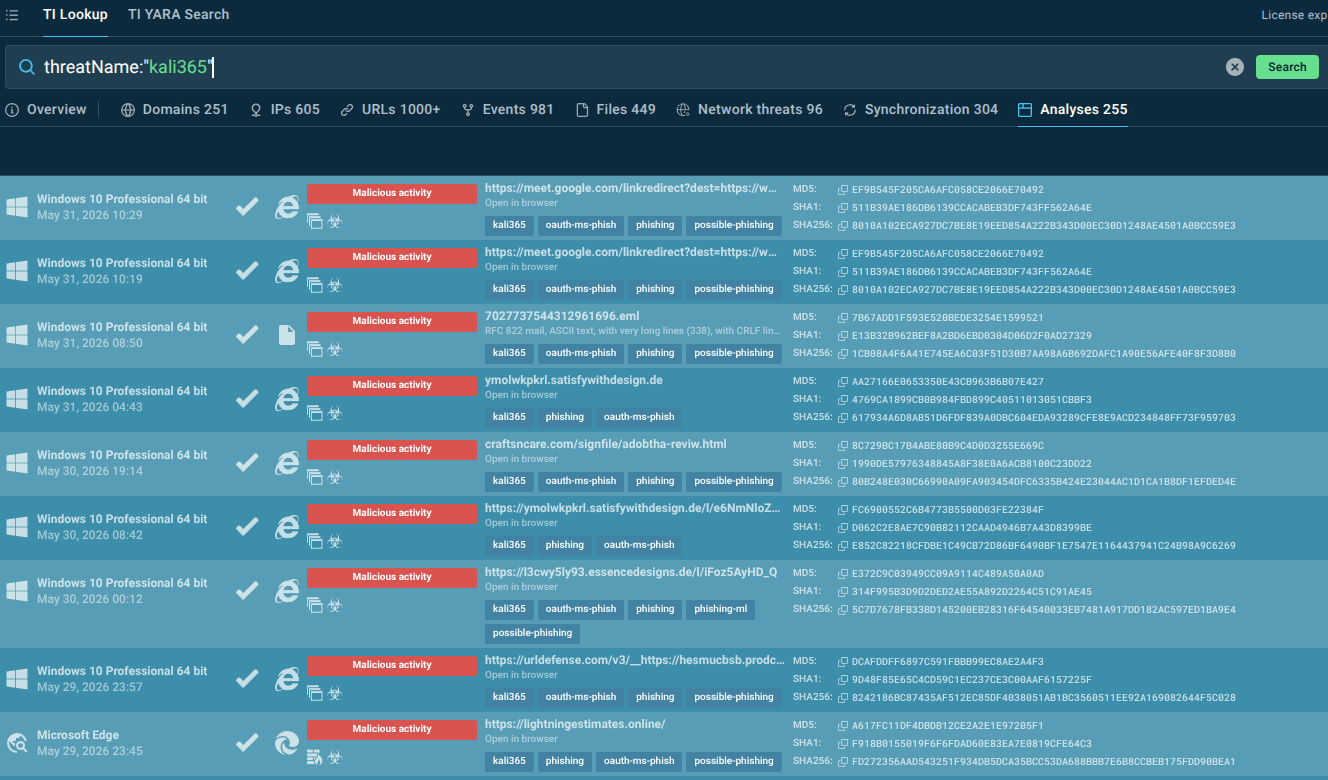
Discover how the Kali365 phishing kit targets Outlook, Teams, and OneDrive through OAuth token theft and what organizations can do to defend against this emerging threat.
Read More -
Huntress traced device code phishing from Tencent Cloud to Kali365, a Microsoft 365 kit that steals tokens and keeps access even after MFA or password resets.
Read More -
The Federal Bureau of Investigation (FBI) is issuing this Public Service Announcement (PSA) to warn the public about an emerging Phishing1-as-a-Service2 (PhaaS) platform called Kali365, first seen ...
Read More -

Arctic Wolf recently observed a large scale device code phishing campaign leveraging the Kali365 phishing‑as‑a‑service platform to obtain initial access and conduct follow-on activity.
Read More
Related rules
- Entra ID AiTM Phishing-Kit Chain Detected
- Entra ID Kali365 Default User-Agent Detected
- Entra ID Device Registration with Phishing Kit Default OS Build
- Entra ID Device Registration with ROADtools Default OS Build
- Microsoft Entra ID Impossible Travel Sign-in