Entra ID Device with ROADtools Default OS Build (Entity Analytics)
Identifies the first occurrence of a Microsoft Entra ID device, surfaced through the Entra ID Entity Analytics device
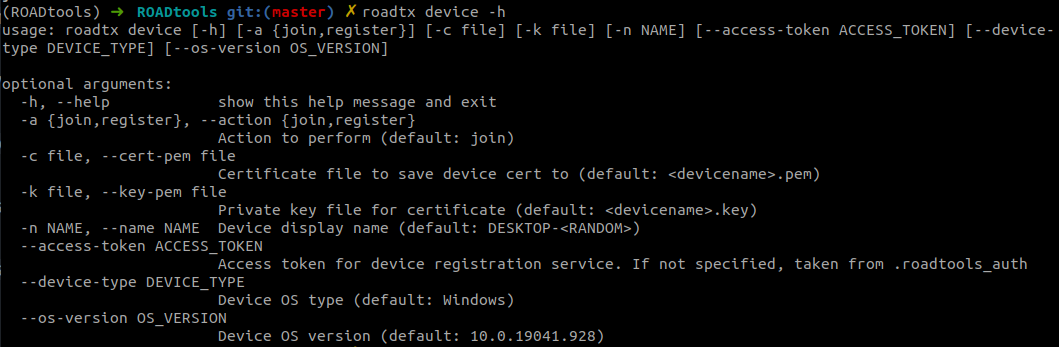
inventory, whose host name follows the default "DESKTOP-" pattern and whose operating system build is 10.0.19041.928.
This combination is the default device profile that ROADtools (roadtx) uses when registering a device, and the OS build
typically differs from the patched OS versions of legitimate hosts in the environment. Adversaries register rogue
devices in Entra ID to acquire a Primary Refresh Token (PRT), establish persistence, and obtain trusted, programmatic
access to the tenant. Because the OS build is a tool default, this is a high-fidelity but evadable indicator; baseline
approved device builds and naming conventions before relying on it.
Elastic rule (View on GitHub)
  1[metadata]
  2creation_date = "2026/05/26"
  3integration = ["entityanalytics_entra_id"]
  4maturity = "production"
  5updated_date = "2026/09/18"
  6
  7[rule]
  8author = ["Elastic"]
  9description = """
 10Identifies the first occurrence of a Microsoft Entra ID device, surfaced through the Entra ID Entity Analytics device
 11inventory, whose host name follows the default "DESKTOP-" pattern and whose operating system build is `10.0.19041.928`.
 12This combination is the default device profile that ROADtools (roadtx) uses when registering a device, and the OS build
 13typically differs from the patched OS versions of legitimate hosts in the environment. Adversaries register rogue
 14devices in Entra ID to acquire a Primary Refresh Token (PRT), establish persistence, and obtain trusted, programmatic
 15access to the tenant. Because the OS build is a tool default, this is a high-fidelity but evadable indicator; baseline
 16approved device builds and naming conventions before relying on it.
 17"""
 18false_positives = [
 19    """
 20    Unmanaged or imaged Windows 10 20H1 hosts may legitimately report the `10.0.19041.928` build with a default
 21    "DESKTOP-" host name. Validate against your device inventory and patch baseline before escalating.
 22    """,
 23    """
 24    Authorized red team or penetration testing engagements that use ROADtools to register devices will appear in the
 25    device inventory and match this rule. If this is expected, add exceptions for the specific host names or device IDs.
 26    """,
 27]
 28from = "now-6h"
 29index = ["logs-entityanalytics_entra_id.device-*"]
 30interval = "1h"
 31language = "kuery"
 32license = "Elastic License v2"
 33name = "Entra ID Device with ROADtools Default OS Build (Entity Analytics)"
 34note = """## Triage and analysis
 35
 36### Investigating Entra ID Device with ROADtools Default OS Build (Entity Analytics)
 37
 38ROADtools (roadtx) registers a device in Entra ID with a default OS build of `10.0.19041.928` and a default name of
 39`DESKTOP-<8 random characters>`. This OS build is the current default value roadtx uses and differs from
 40the OS version of legitimate hosts, making the build a useful indicator of ROADtools device registration. This rule runs
 41against the Entra ID Entity Analytics device inventory and fires the first time a device matching this fingerprint
 42appears, so an alert generally represents a newly observed rogue device rather than a real-time registration event.
 43Rogue device registration is typically a precursor to Primary Refresh Token (PRT) acquisition, MFA/Conditional Access
 44bypass, and persistent token-based access.
 45
 46### Possible investigation steps
 47
 48- Confirm the device identity via `host.name`, `host.os.version`, `entityanalytics_entra_id.device.display_name`, and
 49`entityanalytics_entra_id.device.id` (or `device.id`). Default `DESKTOP-` names that do not match your naming convention
 50are suspicious.
 51- Review `entityanalytics_entra_id.device.registration_date_time` and `entityanalytics_entra_id.device.trust_type` to
 52establish when and how the device was registered (e.g., Azure AD registered vs. joined).
 53- Identify the registered owner via `entityanalytics_entra_id.device.registered_owners.user_principal_name` and determine
 54whether that user is expected to register a new device.
 55- Check `entityanalytics_entra_id.device.is_managed` and `entityanalytics_entra_id.device.is_compliant`; ROADtools
 56devices are typically unmanaged and non-compliant.
 57- Pivot to `logs-azure.auditlogs-*` for the corresponding `Add device` event (initiated by the `Device Registration
 58Service`) and to `logs-azure.signinlogs-*` for sign-ins by the device owner where the incoming token type is a
 59`primaryRefreshToken`.
 60- Correlate with the companion audit-log rule "Entra ID Device Registration with ROADtools Default OS Build"
 61for the same device name to confirm registration-time activity.
 62
 63### False positive analysis
 64
 65- Unmanaged or imaged Windows 10 20H1 hosts may legitimately report the `10.0.19041.928` build with a default
 66`DESKTOP-` host name. Validate against device inventory and patch baseline.
 67- Authorized security assessments using ROADtools will appear in inventory. Document the engagement and add scoped
 68exceptions.
 69
 70### Response and remediation
 71
 72- If confirmed malicious, remove the device from Entra ID and revoke the owner's refresh tokens and primary refresh
 73tokens.
 74- Disable the account or reset credentials per policy and review for additional persistence (added owners, app
 75registrations, or service principal credentials).
 76- Tighten device registration and join controls via Conditional Access (restrict who can register/join devices and
 77require MFA for registration).
 78"""
 79references = [
 80    "https://unit42.paloaltonetworks.com/roadtools-cloud-attacks/",
 81    "https://github.com/dirkjanm/ROADtools",
 82    "https://dirkjanm.io/introducing-roadtools-token-exchange-roadtx/",
 83]
 84risk_score = 73
 85rule_id = "10b63b69-9f08-4767-b318-12208f97ad41"
 86severity = "high"
 87tags = [
 88    "Domain: Cloud",
 89    "Domain: Identity",
 90    "Data Source: Microsoft Entra ID",
 91    "Data Source: Microsoft Entra ID Entity Analytics",
 92    "Use Case: Asset Visibility",
 93    "Use Case: Threat Detection",
 94    "Tactic: Persistence",
 95    "Resources: Investigation Guide",
 96    "Noise: Unknown",
 97    "Performance: Fast",
 98    "Rule Type: New Terms",
 99    "Platform: Entra ID",
100]
101timestamp_override = "event.ingested"
102type = "new_terms"
103
104query = '''
105data_stream.dataset:"entityanalytics_entra_id.device" and
106    event.provider:"Microsoft Entra ID" and
107    host.name:DESKTOP-* and host.os.version:"10.0.19041.928"
108'''
109
110
111[[rule.threat]]
112framework = "MITRE ATT&CK"
113[[rule.threat.technique]]
114id = "T1098"
115name = "Account Manipulation"
116reference = "https://attack.mitre.org/techniques/T1098/"
117[[rule.threat.technique.subtechnique]]
118id = "T1098.005"
119name = "Device Registration"
120reference = "https://attack.mitre.org/techniques/T1098/005/"
121
122
123
124[rule.threat.tactic]
125id = "TA0003"
126name = "Persistence"
127reference = "https://attack.mitre.org/tactics/TA0003/"
128
129[rule.investigation_fields]
130field_names = [
131    "@timestamp",
132    "host.name",
133    "host.id",
134    "host.os.version",
135    "event.provider",
136    "entityanalytics_entra_id.device.display_name",
137    "entityanalytics_entra_id.device.operating_system",
138    "entityanalytics_entra_id.device.operating_system_version",
139    "entityanalytics_entra_id.device.trust_type",
140    "entityanalytics_entra_id.device.profile_type",
141    "entityanalytics_entra_id.device.is_managed",
142    "entityanalytics_entra_id.device.is_compliant",
143    "entityanalytics_entra_id.device.registration_date_time",
144    "entityanalytics_entra_id.device.registered_owners.user_principal_name",
145    "entityanalytics_entra_id.device.id",
146    "device.id",
147]
148
149[rule.new_terms]
150field = "new_terms_fields"
151value = ["host.id"]
152[[rule.new_terms.history_window_start]]
153field = "history_window_start"
154value = "now-7d"
Triage and analysis
Investigating Entra ID Device with ROADtools Default OS Build (Entity Analytics)
ROADtools (roadtx) registers a device in Entra ID with a default OS build of 10.0.19041.928 and a default name of
DESKTOP-<8 random characters>. This OS build is the current default value roadtx uses and differs from
the OS version of legitimate hosts, making the build a useful indicator of ROADtools device registration. This rule runs
against the Entra ID Entity Analytics device inventory and fires the first time a device matching this fingerprint
appears, so an alert generally represents a newly observed rogue device rather than a real-time registration event.
Rogue device registration is typically a precursor to Primary Refresh Token (PRT) acquisition, MFA/Conditional Access
bypass, and persistent token-based access.
Possible investigation steps
- Confirm the device identity via
host.name,host.os.version,entityanalytics_entra_id.device.display_name, andentityanalytics_entra_id.device.id(ordevice.id). DefaultDESKTOP-names that do not match your naming convention are suspicious. - Review
entityanalytics_entra_id.device.registration_date_timeandentityanalytics_entra_id.device.trust_typeto establish when and how the device was registered (e.g., Azure AD registered vs. joined). - Identify the registered owner via
entityanalytics_entra_id.device.registered_owners.user_principal_nameand determine whether that user is expected to register a new device. - Check
entityanalytics_entra_id.device.is_managedandentityanalytics_entra_id.device.is_compliant; ROADtools devices are typically unmanaged and non-compliant. - Pivot to
logs-azure.auditlogs-*for the correspondingAdd deviceevent (initiated by theDevice Registration Service) and tologs-azure.signinlogs-*for sign-ins by the device owner where the incoming token type is aprimaryRefreshToken. - Correlate with the companion audit-log rule "Entra ID Device Registration with ROADtools Default OS Build" for the same device name to confirm registration-time activity.
False positive analysis
- Unmanaged or imaged Windows 10 20H1 hosts may legitimately report the
10.0.19041.928build with a defaultDESKTOP-host name. Validate against device inventory and patch baseline. - Authorized security assessments using ROADtools will appear in inventory. Document the engagement and add scoped exceptions.
Response and remediation
- If confirmed malicious, remove the device from Entra ID and revoke the owner's refresh tokens and primary refresh tokens.
- Disable the account or reset credentials per policy and review for additional persistence (added owners, app registrations, or service principal credentials).
- Tighten device registration and join controls via Conditional Access (restrict who can register/join devices and require MFA for registration).
References
-

Open-source framework ROADtools is being misused by threat actors for cloud intrusions. Learn how to identify its malicious use.
Read More -
A collection of Azure AD/Entra tools for offensive and defensive security purposes - dirkjanm/ROADtools
Read More -
Ever since the initial release of ROADrecon and the ROADtools framework I have been adding new features to it, especially on the authentication side. As a result, it supports many forms of authentication, such as using Primary Refresh Tokens (PRTs), PRT cookies, and regular access/refresh tokens. The authentication modules are all part of the shared library roadlib, and can be used in other tools by importing the library. Even though you can request tokens for any Azure AD connected resource and with many client IDs, the only tool exposing this authentication part was ROADrecon. It always felt unnatural and illogical to tell people that you can use a recon tool to request tokens for many other purposes. So I decided to start writing a new tool, which resolves around requesting and using Azure AD tokens. As I was working on this, I started adding proof of concepts I wrote during my Azure AD devices research into the tool, adding support for registering devices and requesting Primary Refresh Tokens using device credentials. I also added various modules for injecting PRTs into browser sessions with Selenium, and for automating authentication with MFA. The result is a comprehensive tool called ROADtools Token eXchange, or simply roadtx. Currently it has the following capabilities:
Read More
Related rules
- Entra ID Phishing Kit Default OS Build (Entity Analytics)
- Entra ID AiTM Phishing-Kit Chain Detected
- Entra ID Conditional Access Policy (CAP) Modified
- Entra ID Device Registration with Phishing Kit Default OS Build
- Entra ID Device Registration with ROADtools Default OS Build