Entra ID Non-Passkey Sign-In with Unusual Browser and OS
Identifies a successful Microsoft Entra ID sign-in from a browser and operating system combination not previously seen for the user, without a phishing-resistant method and not from an Entra-joined or registered device. Adversary-in-the-middle proxies often present a spoofed client fingerprint, including impossible pairings such as Safari on Windows, to suppress the passkey prompt and force a phishable fallback. A genuinely new client also triggers this rule, so corroborate with source and authentication context.
Elastic rule (View on GitHub)
  1[metadata]
  2creation_date = "2026/10/21"
  3integration = ["azure"]
  4maturity = "production"
  5updated_date = "2026/10/21"
  6
  7[rule]
  8author = ["Elastic"]
  9description = """
 10Identifies a successful Microsoft Entra ID sign-in from a browser and operating system combination not previously seen
 11for the user, without a phishing-resistant method and not from an Entra-joined or registered device.
 12Adversary-in-the-middle proxies often present a spoofed client fingerprint, including impossible pairings such as Safari
 13on Windows, to suppress the passkey prompt and force a phishable fallback. A genuinely new client also triggers this
 14rule, so corroborate with source and authentication context.
 15"""
 16false_positives = [
 17    """
 18    A legitimate new or rare client (a new operating system, a newly adopted browser, a privacy-hardened or developer
 19    browser, or a corporate kiosk/appliance) produces a new browser/OS combination the first time the user is seen on
 20    it. The device-trust filter already excludes the user's Entra-joined and registered endpoints, so the residual false
 21    positives are first sign-ins from genuinely unmanaged personal devices (BYOD, a home laptop, a new phone). Baseline
 22    the browser and OS families that are normal for the user and add exceptions for sanctioned clients, and correlate
 23    the source IP, ASN, and the authentication methods completed in the session before escalating.
 24    """,
 25]
 26from = "now-9m"
 27index = ["logs-azure.signinlogs-*"]
 28language = "kuery"
 29license = "Elastic License v2"
 30name = "Entra ID Non-Passkey Sign-In with Unusual Browser and OS"
 31note = """## Triage and analysis
 32
 33### Investigating Entra ID Non-Passkey Sign-In with Unusual Browser and OS Combination
 34
 35Microsoft Entra ID recorded a successful sign-in whose browser family and operating-system family combination has not been seen for this user in the history window, on an authentication that did not complete a phishing-resistant method and did not come from an Entra-joined or registered device. Because the browser and OS families are version-independent, this is a new client type rather than a routine version change. Adversary-in-the-middle proxies and automation often present a client fingerprint that matches no legitimate client the user has used, including impossible pairings (for example Safari on Windows) produced by a spoofed user agent used to suppress the passkey prompt and force a phishable fallback, as documented by Proofpoint.
 36
 37### Possible investigation steps
 38
 39- Inspect the new combination (`user_agent.name`, `azure.signinlogs.properties.device_detail.operating_system`) and the raw `user_agent.original`; determine whether the pairing is impossible (Safari only runs on Apple operating systems), merely rare, or a legitimately new client for the environment.
 40- Review `source.ip`, geo, and ASN for a hosting provider, VPS, or anonymizing origin inconsistent with the user's norm.
 41- Examine the authentication methods completed in the session (`azure.signinlogs.properties.authentication_details`): a phishable method (Authenticator push, OATH, SMS, voice) succeeding for a user who normally uses a passkey is a downgrade indicator.
 42- Check the Conditional Access result (`azure.signinlogs.properties.conditional_access_status`) to determine whether access was actually granted, and whether the same user also triggered the MFA-downgrade posture rule ("Entra ID MFA Downgrade from Phishing-Resistant Posture").
 43- Correlate with subsequent token reuse (`Previously satisfied`) from the same session or ASN for stolen-session use.
 44
 45### False positive analysis
 46
 47- The first sign-in from any genuinely new or rare client (new OS, newly adopted or developer browser, kiosk/appliance) produces a new combination. Baseline normal browser/OS families and add exceptions for sanctioned clients.
 48- A privacy extension or enterprise proxy that rewrites the user agent can produce stable but unusual pairings; confirm the origin and user before escalating.
 49
 50### Response and remediation
 51
 52- If the sign-in is unauthorized, treat the account as potentially compromised: revoke sessions and refresh tokens, remove any attacker-registered authentication methods or devices (delete devices first to break device-bound PRT persistence), and reset credentials.
 53- Enforce a phishing-resistant Conditional Access authentication strength so suppressing the passkey prompt cannot satisfy authentication with a weaker method.
 54"""
 55references = [
 56    "https://www.proofpoint.com/us/blog/threat-insight/dont-phish-let-me-down-fido-authentication-downgrade",
 57    "https://pushsecurity.com/blog/mfa-downgrade-attacks",
 58    "https://www.ioactive.com/authentication-downgrade-attacks-deep-dive-into-mfa-bypass/",
 59    "https://www.elastic.co/security-labs/entra-id-oauth-phishing-detection",
 60]
 61risk_score = 47
 62rule_id = "d685d0fd-9072-4bf8-bbd2-200051c19289"
 63setup = """#### Required Microsoft Entra ID Sign-In Logs
 64This rule requires the Azure integration with Microsoft Entra ID Sign-In logs enabled and collected via Azure Event Hub.
 65"""
 66severity = "medium"
 67tags = [
 68    "Domain: Cloud",
 69    "Domain: Identity",
 70    "Platform: Entra ID",
 71    "Platform: Azure",
 72    "Data Source: Entra ID Sign-In Logs",
 73    "Use Case: Identity and Access Audit",
 74    "Use Case: Threat Detection",
 75    "Tactic: Credential Access",
 76    "Threat: AiTM Phishing",
 77    "Rule Type: New Terms",
 78    "Resources: Investigation Guide",
 79    "Profile: Beta",
 80]
 81timestamp_override = "event.ingested"
 82type = "new_terms"
 83
 84query = '''
 85data_stream.dataset: "azure.signinlogs" and
 86    azure.signinlogs.category: "SignInLogs" and
 87    azure.signinlogs.properties.authentication_details.authentication_method: (* and not (
 88        "Passkey (synced)" or
 89        "Passkey (device-bound)" or
 90        "FIDO2 security key" or
 91        "Windows Hello for Business" or
 92        "Previously satisfied"
 93    )) and
 94    not azure.signinlogs.properties.device_detail.trust_type: * and
 95    user.name: * and user_agent.name: * and
 96    azure.signinlogs.properties.device_detail.operating_system: * and
 97    event.outcome: "success"
 98'''
 99
100
101[[rule.threat]]
102framework = "MITRE ATT&CK"
103[[rule.threat.technique]]
104id = "T1556"
105name = "Modify Authentication Process"
106reference = "https://attack.mitre.org/techniques/T1556/"
107[[rule.threat.technique.subtechnique]]
108id = "T1556.006"
109name = "Multi-Factor Authentication"
110reference = "https://attack.mitre.org/techniques/T1556/006/"
111
112
113[rule.threat.tactic]
114id = "TA0006"
115name = "Credential Access"
116reference = "https://attack.mitre.org/tactics/TA0006/"
117
118[rule.new_terms]
119field = "new_terms_fields"
120value = ["user.name", "user_agent.name", "azure.signinlogs.properties.device_detail.operating_system"]
121[[rule.new_terms.history_window_start]]
122field = "history_window_start"
123value = "now-10d"
Triage and analysis
Investigating Entra ID Non-Passkey Sign-In with Unusual Browser and OS Combination
Microsoft Entra ID recorded a successful sign-in whose browser family and operating-system family combination has not been seen for this user in the history window, on an authentication that did not complete a phishing-resistant method and did not come from an Entra-joined or registered device. Because the browser and OS families are version-independent, this is a new client type rather than a routine version change. Adversary-in-the-middle proxies and automation often present a client fingerprint that matches no legitimate client the user has used, including impossible pairings (for example Safari on Windows) produced by a spoofed user agent used to suppress the passkey prompt and force a phishable fallback, as documented by Proofpoint.
Possible investigation steps
- Inspect the new combination (
user_agent.name,azure.signinlogs.properties.device_detail.operating_system) and the rawuser_agent.original; determine whether the pairing is impossible (Safari only runs on Apple operating systems), merely rare, or a legitimately new client for the environment. - Review
source.ip, geo, and ASN for a hosting provider, VPS, or anonymizing origin inconsistent with the user's norm. - Examine the authentication methods completed in the session (
azure.signinlogs.properties.authentication_details): a phishable method (Authenticator push, OATH, SMS, voice) succeeding for a user who normally uses a passkey is a downgrade indicator. - Check the Conditional Access result (
azure.signinlogs.properties.conditional_access_status) to determine whether access was actually granted, and whether the same user also triggered the MFA-downgrade posture rule ("Entra ID MFA Downgrade from Phishing-Resistant Posture"). - Correlate with subsequent token reuse (
Previously satisfied) from the same session or ASN for stolen-session use.
False positive analysis
- The first sign-in from any genuinely new or rare client (new OS, newly adopted or developer browser, kiosk/appliance) produces a new combination. Baseline normal browser/OS families and add exceptions for sanctioned clients.
- A privacy extension or enterprise proxy that rewrites the user agent can produce stable but unusual pairings; confirm the origin and user before escalating.
Response and remediation
- If the sign-in is unauthorized, treat the account as potentially compromised: revoke sessions and refresh tokens, remove any attacker-registered authentication methods or devices (delete devices first to break device-bound PRT persistence), and reset credentials.
- Enforce a phishing-resistant Conditional Access authentication strength so suppressing the passkey prompt cannot satisfy authentication with a weaker method.
References
-

Key takeaways FIDO-based passkeys remain a highly recommended authentication method to protect against prevalent credential phishing and account takeover (ATO) threats.
Read More -
MFA downgrade attacks are an increasingly common technique used by attackers to bypass phishing-resistant authentication methods registered to an account.
Read More -
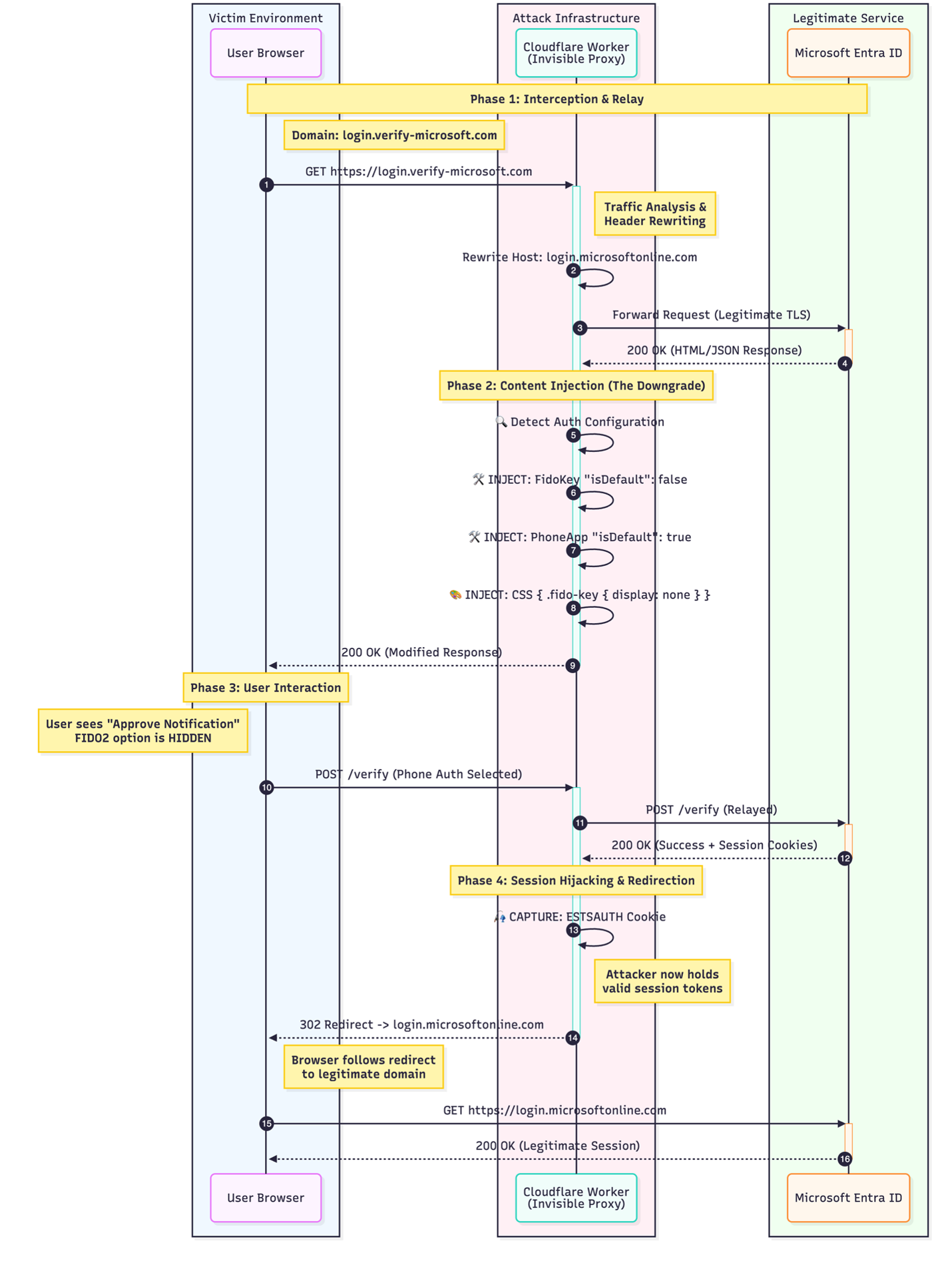
This research introduces two key contributions: first, the weaponization of Cloudflare Workers as a serverless transparent proxy platform that operates on trusted Content Delivery Network (CDN) infrastructure with zero forensic footprint; second, an Authentication Downgrade Attack technique that forces victims to fall back to phishable authentication methods (such as push notifications or OTPs) even when FIDO2 hardware keys are registered.
Read More -

This article explores OAuth phishing and token-based abuse in Microsoft Entra ID. Through emulation and analysis of tokens, scope, and device behavior during sign-in activity, we surface high-fidelity...
Read More
Related rules
- Entra ID Potential Passkey Downgrade
- Entra ID ROPC Authentication with Unknown Client ID
- Entra ID FIDO2 Passkey Registered Outside the Self-Service Portal
- Entra ID Excessive Account Lockouts Detected
- Azure AD Graph Access with Unusual User and ASN