Entra ID Custom Domain Added or Verified
Detects when a custom domain is added or verified in an Entra ID tenant. Adding and verifying a custom domain are precursor steps to configuring domain federation, which can be abused by adversaries to route authentication through an attacker-controlled identity provider (Golden SAML). In most organizations, custom domains are added infrequently and these events should be investigated to ensure they are part of a legitimate administrative workflow.
Elastic rule (View on GitHub)
  1[metadata]
  2creation_date = "2026/03/03"
  3integration = ["azure"]
  4maturity = "production"
  5updated_date = "2026/03/25"
  6
  7[rule]
  8author = ["Elastic"]
  9description = """
 10Detects when a custom domain is added or verified in an Entra ID tenant. Adding and verifying a custom domain are
 11precursor steps to configuring domain federation, which can be abused by adversaries to route authentication through an
 12attacker-controlled identity provider (Golden SAML). In most organizations, custom domains are added infrequently and
 13these events should be investigated to ensure they are part of a legitimate administrative workflow.
 14"""
 15from = "now-9m"
 16index = ["filebeat-*", "logs-azure.auditlogs-*"]
 17language = "kuery"
 18license = "Elastic License v2"
 19name = "Entra ID Custom Domain Added or Verified"
 20note = """## Triage and analysis
 21
 22### Investigating Entra ID Custom Domain Added or Verified
 23
 24This rule detects when a custom domain is added or verified in an Entra ID tenant. These are precursor steps required before an adversary can configure domain federation. While adding and verifying domains are legitimate administrative activities, they are infrequent in most organizations. When observed without a corresponding change request or IT workflow, they may indicate the early stages of a Golden SAML or BYOIDP (Bring Your Own Identity Provider) attack.
 25
 26While adding and verifying domains are legitimate administrative activities, they are infrequent in most organizations. When observed without a corresponding change request or IT workflow, they may indicate the early stages of a Golden SAML or BYOIDP (Bring Your Own Identity Provider) attack.
 27
 28### Possible investigation steps
 29
 30- Review `azure.auditlogs.properties.initiated_by.user.userPrincipalName` and `ipAddress` to identify who performed the action and from where.
 31- For `"Add unverified domain"` events, check `azure.auditlogs.properties.target_resources.0.display_name` for the domain name that was added.
 32- Determine whether the domain is known to the organization or is potentially adversary-controlled.
 33- Check if a corresponding `"Verify domain"` event follows shortly after and from the same actor.
 34- Look for subsequent `"Set domain authentication"` or `"Set federation settings on domain"` events that would indicate the domain was federated — this escalates the severity significantly.
 35- Verify with the Global Administrator or IT team whether a domain addition was planned.
 36- Check DNS records for the domain to understand who owns it and when the verification TXT record was added.
 37- Review the `user_agent.original` field for the actor to determine if the change was made via the Azure Portal, Microsoft Graph API, or PowerShell, which may provide additional context on whether this was a manual or scripted action.
 38
 39### False positive analysis
 40
 41- Legitimate domain additions during initial tenant setup, organizational expansion, or mergers and acquisitions.
 42- IT administrators adding domains for new email routing, SharePoint vanity URLs, or multi-domain configurations.
 43- Automated provisioning systems that manage domain lifecycle.
 44- Validate with the identity or IT team before dismissing these events.
 45
 46### Response and remediation
 47
 48- If the domain addition is unauthorized, immediately remove the unverified or verified domain: `Remove-MgDomain -DomainId "<domain>"`.
 49- Investigate how the actor obtained privileges to add domains (requires Global Administrator or Domain Administrator role).
 50- Review the tenant for any other unauthorized changes made by the same actor using the `azure.correlation_id` or actor identity.
 51- If the domain was already federated, escalate to the response steps in the companion rule `Entra ID Domain Federation Configuration Change`.
 52- Restrict domain management operations by implementing PIM (Privileged Identity Management) for Global Administrator roles.
 53"""
 54references = [
 55    "https://cloud.google.com/blog/topics/threat-intelligence/unc2452-merged-into-apt29",
 56    "https://learn.microsoft.com/en-us/graph/api/domain-post-domains",
 57    "https://learn.microsoft.com/en-us/graph/api/domain-verify",
 58    "https://medium.com/tenable-techblog/roles-allowing-to-abuse-entra-id-federation-for-persistence-and-privilege-escalation-df9ca6e58360",
 59    "https://securitylabs.datadoghq.com/articles/i-spy-escalating-to-entra-id-global-admin/",
 60]
 61risk_score = 21
 62rule_id = "7dc921db-4cd3-48ef-88bf-2bfa91f29f5c"
 63setup = """### Microsoft Entra ID Audit Logs
 64This rule requires the Azure integration with Microsoft Entra ID Audit Logs data stream ingesting in your Elastic Stack deployment. For more information, refer to the [Microsoft Entra ID Audit Logs integration documentation](https://www.elastic.co/docs/reference/integrations/azure/adlogs).
 65"""
 66severity = "low"
 67tags = [
 68    "Domain: Cloud",
 69    "Domain: Identity",
 70    "Data Source: Azure",
 71    "Data Source: Microsoft Entra ID",
 72    "Data Source: Microsoft Entra ID Audit Logs",
 73    "Use Case: Identity and Access Audit",
 74    "Tactic: Discovery",
 75    "Tactic: Resource Development",
 76    "Resources: Investigation Guide",
 77]
 78timestamp_override = "event.ingested"
 79type = "query"
 80
 81query = '''
 82event.dataset: azure.auditlogs
 83    and azure.auditlogs.properties.category: DirectoryManagement
 84    and event.action: ("Add unverified domain" or "Verify domain")
 85    and event.outcome: success
 86'''
 87
 88
 89[[rule.threat]]
 90framework = "MITRE ATT&CK"
 91[[rule.threat.technique]]
 92id = "T1584"
 93name = "Compromise Infrastructure"
 94reference = "https://attack.mitre.org/techniques/T1584/"
 95[[rule.threat.technique.subtechnique]]
 96id = "T1584.001"
 97name = "Domains"
 98reference = "https://attack.mitre.org/techniques/T1584/001/"
 99
100
101
102[rule.threat.tactic]
103id = "TA0042"
104name = "Resource Development"
105reference = "https://attack.mitre.org/tactics/TA0042/"
Triage and analysis
Investigating Entra ID Custom Domain Added or Verified
This rule detects when a custom domain is added or verified in an Entra ID tenant. These are precursor steps required before an adversary can configure domain federation. While adding and verifying domains are legitimate administrative activities, they are infrequent in most organizations. When observed without a corresponding change request or IT workflow, they may indicate the early stages of a Golden SAML or BYOIDP (Bring Your Own Identity Provider) attack.
While adding and verifying domains are legitimate administrative activities, they are infrequent in most organizations. When observed without a corresponding change request or IT workflow, they may indicate the early stages of a Golden SAML or BYOIDP (Bring Your Own Identity Provider) attack.
Possible investigation steps
- Review
azure.auditlogs.properties.initiated_by.user.userPrincipalNameandipAddressto identify who performed the action and from where. - For
"Add unverified domain"events, checkazure.auditlogs.properties.target_resources.0.display_namefor the domain name that was added. - Determine whether the domain is known to the organization or is potentially adversary-controlled.
- Check if a corresponding
"Verify domain"event follows shortly after and from the same actor. - Look for subsequent
"Set domain authentication"or"Set federation settings on domain"events that would indicate the domain was federated — this escalates the severity significantly. - Verify with the Global Administrator or IT team whether a domain addition was planned.
- Check DNS records for the domain to understand who owns it and when the verification TXT record was added.
- Review the
user_agent.originalfield for the actor to determine if the change was made via the Azure Portal, Microsoft Graph API, or PowerShell, which may provide additional context on whether this was a manual or scripted action.
False positive analysis
- Legitimate domain additions during initial tenant setup, organizational expansion, or mergers and acquisitions.
- IT administrators adding domains for new email routing, SharePoint vanity URLs, or multi-domain configurations.
- Automated provisioning systems that manage domain lifecycle.
- Validate with the identity or IT team before dismissing these events.
Response and remediation
- If the domain addition is unauthorized, immediately remove the unverified or verified domain:
Remove-MgDomain -DomainId "<domain>". - Investigate how the actor obtained privileges to add domains (requires Global Administrator or Domain Administrator role).
- Review the tenant for any other unauthorized changes made by the same actor using the
azure.correlation_idor actor identity. - If the domain was already federated, escalate to the response steps in the companion rule
Entra ID Domain Federation Configuration Change. - Restrict domain management operations by implementing PIM (Privileged Identity Management) for Global Administrator roles.
References
-

UNC2452 Merged into APT29. Mandiant has gathered sufficient evidence to assess that the activity tracked as UNC2452 is attributable to APT29.
Read More -

-
-
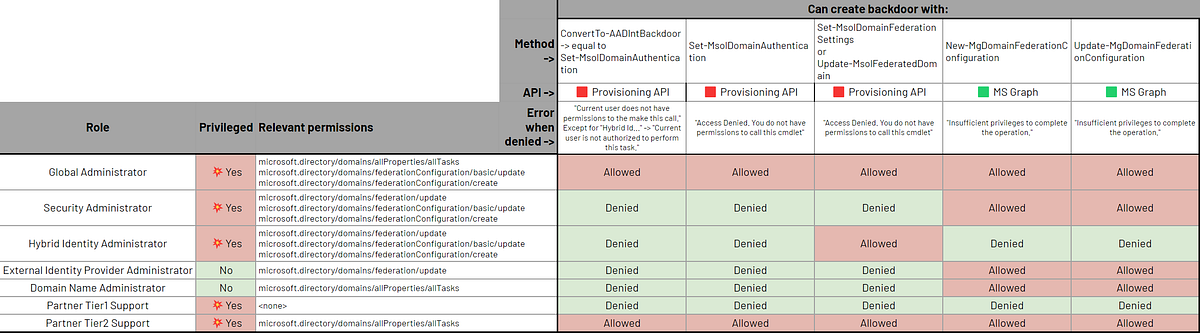
Which Entra ID (ex-Azure AD) roles allow configuring federated authentication, thus allowing persistence and privilege escalation 💥
Read More -

Backdooring Microsoft's applications is far from over. Adding service principal credentials to these apps to escalate privileges and obfuscate activities has been seen in nation-state attacks, and led to the development of new security controls. Despite these efforts, we uncovered a vulnerable, built-in SP that could have allowed escalation from Application Administrator to any hybrid tenant user, including Global Admin.
Read More
Related rules
- Entra ID Domain Federation Configuration Change
- Entra ID Federated Identity Credential Issuer Modified
- Entra ID Unusual Cloud Device Registration
- Entra ID Elevated Access to User Access Administrator
- Entra ID Global Administrator Role Assigned