Entra ID Temporary Access Pass Created for User
Identifies the creation of a Temporary Access Pass (TAP) for an Entra ID user account. A TAP is a time-limited passcode that allows passwordless authentication and bypasses existing MFA requirements, including phishing-resistant methods. An attacker with User Administrator or Authentication Administrator privileges can issue a TAP for a target account, sign in without the current password, and register new persistent authentication methods before the TAP expires.
Elastic rule (View on GitHub)
  1[metadata]
  2creation_date = "2026/05/20"
  3integration = ["azure"]
  4maturity = "production"
  5updated_date = "2026/09/18"
  6
  7[rule]
  8author = ["Elastic", "descambiado"]
  9description = """
 10Identifies the creation of a Temporary Access Pass (TAP) for an Entra ID user account. A TAP
 11is a time-limited passcode that allows passwordless authentication and bypasses existing MFA
 12requirements, including phishing-resistant methods. An attacker with User Administrator or
 13Authentication Administrator privileges can issue a TAP for a target account, sign in without
 14the current password, and register new persistent authentication methods before the TAP expires.
 15"""
 16false_positives = [
 17    """
 18    Help desk teams issuing TAPs for locked-out users or new employee onboarding workflows. Automated
 19    identity lifecycle systems that provision TAPs during device enrollment.
 20    """,
 21]
 22from = "now-9m"
 23index = ["logs-azure.auditlogs-*"]
 24language = "kuery"
 25license = "Elastic License v2"
 26name = "Entra ID Temporary Access Pass Created for User"
 27note = """## Triage and analysis
 28
 29### Investigating Entra ID Temporary Access Pass Created for User
 30
 31A Temporary Access Pass is a time-limited credential that bypasses all existing MFA factors for the
 32target account. In a steady-state tenant, TAP creation is rare and should be correlated against help
 33desk records or onboarding workflows.
 34
 35#### Possible investigation steps
 36
 37- Identify the administrator who created the TAP (`azure.auditlogs.properties.initiated_by`) and verify
 38  whether the action was authorized by a help desk ticket or change management record.
 39- Identify the target account and assess its privilege level -- TAPs issued for Global Administrators,
 40  Application Administrators, or accounts with high-value data access are highest risk.
 41- Check for sign-ins by the target account using the TAP credential: look for sign-ins where
 42  `azure.signinlogs.properties.authentication_details` contains "Temporary Access Pass" shortly after
 43  the TAP creation event.
 44- If the TAP was used to sign in, review what authentication methods were registered during or after
 45  the session -- an attacker will use the TAP window to add a persistent authenticator.
 46- Check whether the creating administrator's account shows anomalous activity in the preceding 24 hours.
 47
 48### False positive analysis
 49
 50- TAP creation by your identity team for locked-out users is a legitimate workflow. Confirm via help
 51  desk ticket correlation.
 52- New employee onboarding that provisions TAPs as part of passwordless enrollment is expected behavior.
 53
 54### Response and remediation
 55
 56- Revoke the TAP immediately if unauthorized: Entra ID > Users > Authentication methods.
 57- Audit all authentication methods registered by the target account after TAP creation and remove any
 58  that were not previously present.
 59- Reset the target account's password and revoke all active sessions.
 60- Review the creating administrator's recent actions for signs of compromise.
 61"""
 62references = [
 63    "https://learn.microsoft.com/en-us/entra/identity/authentication/howto-authentication-temporary-access-pass",
 64    "https://dirkjanm.io/lateral-movement-and-hash-dumping-with-temporary-access-passes-microsoft-entra/",
 65    "https://specterops.io/blog/2023/03/29/id-tap-that-pass/",
 66]
 67risk_score = 73
 68rule_id = "d0088204-675b-4175-bf07-1665da2d4810"
 69severity = "high"
 70tags = [
 71    "Domain: Cloud",
 72    "Domain: Identity",
 73    "Data Source: Azure",
 74    "Data Source: Microsoft Entra ID",
 75    "Data Source: Microsoft Entra ID Audit Logs",
 76    "Use Case: Identity and Access Audit",
 77    "Tactic: Initial Access",
 78    "Tactic: Lateral Movement",
 79    "Resources: Investigation Guide",
 80    "Noise: Low",
 81    "Performance: Normal",
 82    "Rule Type: Custom Query (KQL)",
 83    "Platform: Entra ID",
 84]
 85timestamp_override = "event.ingested"
 86type = "query"
 87
 88query = '''
 89data_stream.dataset: "azure.auditlogs" and
 90(
 91    (
 92        azure.auditlogs.operation_name: "User registered security info" and
 93        azure.auditlogs.properties.result_reason: "User registered temporary access pass method"
 94    ) or (
 95        azure.auditlogs.operation_name: "Create Temporary Access Pass method for user"
 96    ) or (
 97        azure.auditlogs.operation_name: "Admin registered security info" and
 98        azure.auditlogs.properties.target_resources.*.modified_properties.*.display_name: *TemporaryAccessPass*
 99    )
100) and
101event.outcome: ("Success" or "success")
102'''
103
104[[rule.threat]]
105framework = "MITRE ATT&CK"
106
107[[rule.threat.technique]]
108id = "T1078"
109name = "Valid Accounts"
110reference = "https://attack.mitre.org/techniques/T1078/"
111
112[[rule.threat.technique.subtechnique]]
113id = "T1078.004"
114name = "Cloud Accounts"
115reference = "https://attack.mitre.org/techniques/T1078/004/"
116
117[rule.threat.tactic]
118id = "TA0001"
119name = "Initial Access"
120reference = "https://attack.mitre.org/tactics/TA0001/"
121
122[[rule.threat]]
123framework = "MITRE ATT&CK"
124
125[[rule.threat.technique]]
126id = "T1550"
127name = "Use Alternate Authentication Material"
128reference = "https://attack.mitre.org/techniques/T1550/"
129
130[rule.threat.tactic]
131id = "TA0008"
132name = "Lateral Movement"
133reference = "https://attack.mitre.org/tactics/TA0008/"
Triage and analysis
Investigating Entra ID Temporary Access Pass Created for User
A Temporary Access Pass is a time-limited credential that bypasses all existing MFA factors for the target account. In a steady-state tenant, TAP creation is rare and should be correlated against help desk records or onboarding workflows.
Possible investigation steps
- Identify the administrator who created the TAP (
azure.auditlogs.properties.initiated_by) and verify whether the action was authorized by a help desk ticket or change management record. - Identify the target account and assess its privilege level -- TAPs issued for Global Administrators, Application Administrators, or accounts with high-value data access are highest risk.
- Check for sign-ins by the target account using the TAP credential: look for sign-ins where
azure.signinlogs.properties.authentication_detailscontains "Temporary Access Pass" shortly after the TAP creation event. - If the TAP was used to sign in, review what authentication methods were registered during or after the session -- an attacker will use the TAP window to add a persistent authenticator.
- Check whether the creating administrator's account shows anomalous activity in the preceding 24 hours.
False positive analysis
- TAP creation by your identity team for locked-out users is a legitimate workflow. Confirm via help desk ticket correlation.
- New employee onboarding that provisions TAPs as part of passwordless enrollment is expected behavior.
Response and remediation
- Revoke the TAP immediately if unauthorized: Entra ID > Users > Authentication methods.
- Audit all authentication methods registered by the target account after TAP creation and remove any that were not previously present.
- Reset the target account's password and revoke all active sessions.
- Review the creating administrator's recent actions for signs of compromise.
References
-

Learn how to configure and enable users to register passwordless authentication methods by using a Temporary Access Pass (TAP).
Read More -
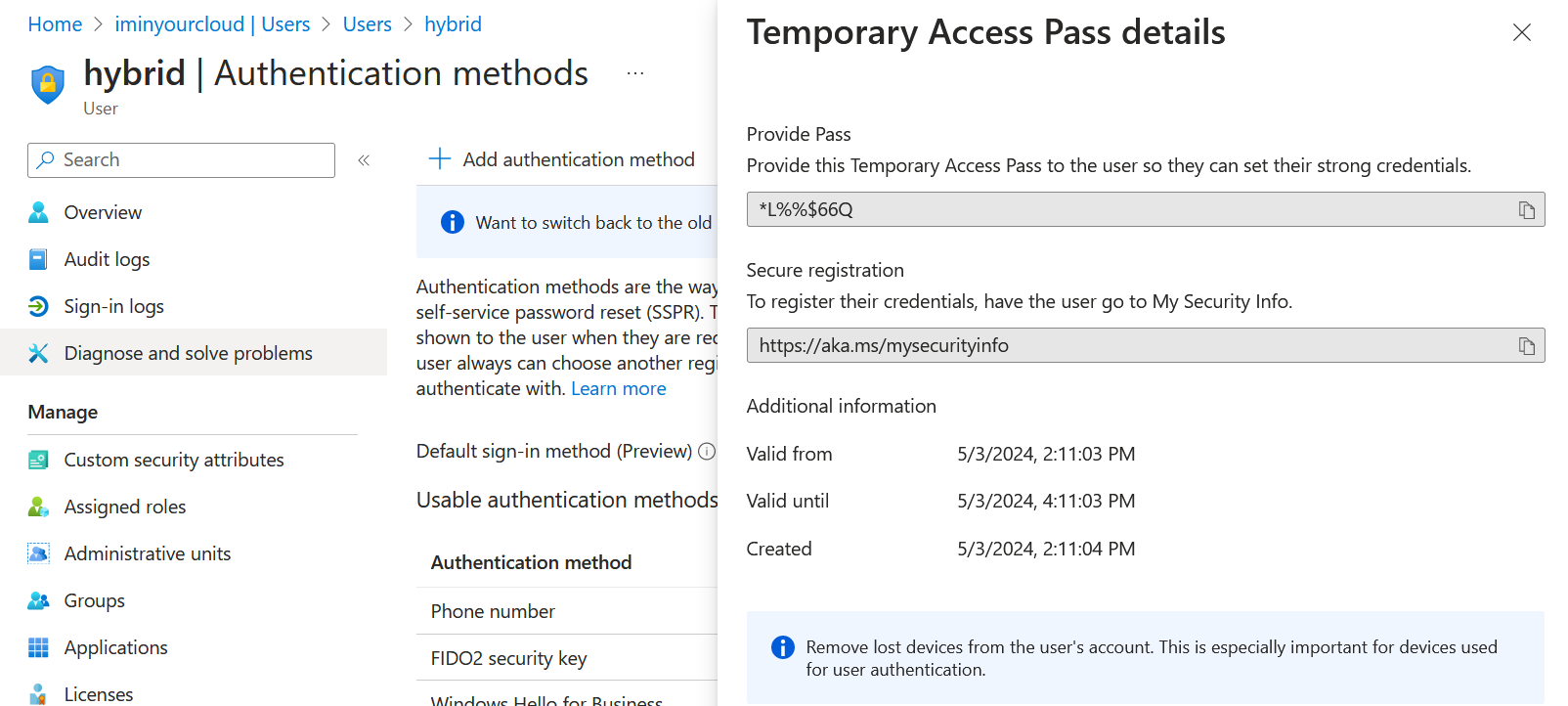
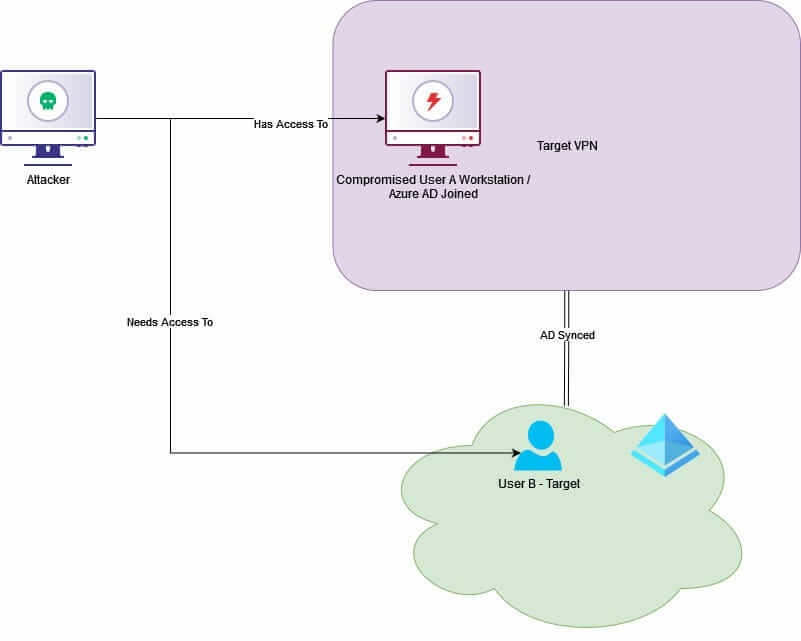
Temporary Access Passes are a method for Microsoft Entra ID (formerly Azure AD) administrators to configure a temporary password for user accounts, which will also satisfy Multi Factor Authentication controls. They can be a useful tool in setting up passwordless authentication methods such as FIDO keys and Windows Hello. In this blog, we take a closer look at the options attackers have to abuse Temporary Access Passes for lateral movement, showing how they can be used for passwordless persistence and even to recover on-premises Active Directory passwords in certain hybrid configurations.
Read More -
You can assign users a short lived password called a Temporary Access Pass (TAP) that satisfies most multi-factor authentication requirements implemented in Azure AD...
Read More
Related rules
- Entra ID User Reported Suspicious Activity
- Entra ID Custom Domain Added or Verified
- Entra ID Domain Federation Configuration Change
- Entra ID Global Administrator Role Assigned
- Entra ID Kali365 Default User-Agent Detected