Azure VM Boot Diagnostics Retrieved
Identifies retrieval of Azure VM boot diagnostics data ("MICROSOFT.COMPUTE/VIRTUALMACHINES/RETRIEVEBOOTDIAGNOSTICSDATA/ACTION") by an identity that has not performed this operation recently. Boot diagnostics expose the VM serial console log and a console screenshot, which frequently contain plaintext boot-time output such as credentials, tokens, cloud-init/agent secrets, and command history. An adversary with VM read/contributor rights can retrieve this data over the control plane, without logging into the guest or touching the network, to harvest credentials.
Elastic rule (View on GitHub)
  1[metadata]
  2creation_date = "2026/06/15"
  3integration = ["azure"]
  4maturity = "production"
  5updated_date = "2026/09/18"
  6
  7[rule]
  8author = ["Elastic"]
  9description = """
 10Identifies retrieval of Azure VM boot diagnostics data
 11("MICROSOFT.COMPUTE/VIRTUALMACHINES/RETRIEVEBOOTDIAGNOSTICSDATA/ACTION") by an identity that has not performed this
 12operation recently. Boot diagnostics expose the VM serial console log and a console screenshot, which frequently contain
 13plaintext boot-time output such as credentials, tokens, cloud-init/agent secrets, and command history. An adversary with
 14VM read/contributor rights can retrieve this data over the control plane, without logging into the guest or touching the
 15network, to harvest credentials.
 16"""
 17false_positives = [
 18    """
 19    Support engineers, infrastructure-as-code, and VM health automation may legitimately retrieve boot diagnostics
 20    during troubleshooting. The first occurrence per principal will alert; baseline expected support users, service
 21    principals, and managed identities and exclude them if the activity is verified as authorized.
 22    """,
 23]
 24from = "now-9m"
 25index = ["logs-azure.activitylogs-*"]
 26language = "kuery"
 27license = "Elastic License v2"
 28name = "Azure VM Boot Diagnostics Retrieved"
 29note = """## Triage and analysis
 30
 31### Investigating Azure VM Boot Diagnostics Retrieved
 32
 33Retrieving boot diagnostics (`retrieveBootDiagnosticsData/action`) returns SAS URIs to the VM serial console log and a
 34console screenshot. The serial log often contains plaintext boot output: cloud-init/agent activity, command history, and
 35sometimes credentials or tokens. The action is a control-plane read requiring only VM read/contributor rights, leaves no
 36guest footprint, and bypasses NSG/JIT.
 37
 38### Triage checklist
 39
 40- Identify the acting principal via `azure.activitylogs.identity.authorization.evidence.principal_id` and
 41  `...principal_type` (User vs ServicePrincipal) and `azure.activitylogs.identity.claims.appid`. Service principal or
 42  managed identity retrieval is more suspicious than a known support user.
 43- Review the source: `source.ip`, `source.as.number`, `source.as.organization.name`, `source.geo.country_name`.
 44  Retrieval from cloud hosting, VPS, or anonymizing networks is more suspicious than known corporate egress.
 45- Inspect `azure.resource.id` / `azure.resource.name` to identify the target VM. Was the same principal recently granted
 46  access to it, or is this their first interaction?
 47- Did the same principal recently perform reconnaissance, role assignments, Run Command, or extension operations on the
 48  VM or subscription?
 49
 50### Possible investigation steps
 51
 52- Review the principal's Entra ID sign-in logs and RBAC role assignments on the subscription, resource group, and VM.
 53- Retrieve the boot diagnostics serial log and screenshot from the VM and assess whether they exposed credentials or
 54  other secrets that now require rotation.
 55- Pivot on the VM and any credentials observed in the serial log for follow-on access, lateral movement, or persistence.
 56
 57### Response and remediation
 58
 59- If unauthorized, rotate any credentials/tokens exposed in the serial log, review RBAC on the affected scope, and revoke
 60  the principal's access if compromised.
 61- Collect activity log artifacts per incident procedures.
 62"""
 63references = [
 64    "https://blog.pwnedlabs.io/diving-deep-into-azure-vm-attack-vectors",
 65    "https://www.microsoft.com/en-us/msrc/blog/2023/08/azure-serial-console-attack-and-defense-part-1",
 66    "https://learn.microsoft.com/en-us/azure/virtual-machines/boot-diagnostics",
 67    "https://www.netspi.com/blog/technical-blog/adversary-simulation/7-ways-to-execute-command-on-azure-virtual-machine-virtual-machine-scale-sets/",
 68]
 69risk_score = 47
 70rule_id = "e7509f8f-e70b-4b67-b864-aaa4254b4484"
 71severity = "medium"
 72tags = [
 73    "Domain: Cloud",
 74    "Domain: Endpoint",
 75    "Data Source: Azure",
 76    "Data Source: Azure Activity Logs",
 77    "Use Case: Threat Detection",
 78    "Tactic: Credential Access",
 79    "Resources: Investigation Guide",
 80    "Noise: Low",
 81    "Performance: Fast",
 82    "Rule Type: Custom Query (KQL)",
 83    "Platform: Azure",
 84]
 85timestamp_override = "event.ingested"
 86type = "query"
 87
 88query = '''
 89data_stream.dataset:azure.activitylogs and
 90    event.action:"MICROSOFT.COMPUTE/VIRTUALMACHINES/RETRIEVEBOOTDIAGNOSTICSDATA/ACTION" and
 91    event.outcome:(success or Success)
 92'''
 93
 94
 95[[rule.threat]]
 96framework = "MITRE ATT&CK"
 97[[rule.threat.technique]]
 98id = "T1552"
 99name = "Unsecured Credentials"
100reference = "https://attack.mitre.org/techniques/T1552/"
101
102
103[rule.threat.tactic]
104id = "TA0006"
105name = "Credential Access"
106reference = "https://attack.mitre.org/tactics/TA0006/"
107
108[rule.investigation_fields]
109field_names = [
110    "@timestamp",
111    "event.outcome",
112    "azure.activitylogs.operation_name",
113    "azure.activitylogs.identity.authorization.evidence.principal_id",
114    "azure.activitylogs.identity.authorization.evidence.principal_type",
115    "azure.activitylogs.identity.claims.appid",
116    "azure.resource.name",
117    "azure.resource.id",
118    "source.ip",
119    "source.as.number",
120    "source.as.organization.name",
121    "source.geo.country_name",
122    "azure.subscription_id",
123    "azure.activitylogs.tenant_id",
124]
Triage and analysis
Investigating Azure VM Boot Diagnostics Retrieved
Retrieving boot diagnostics (retrieveBootDiagnosticsData/action) returns SAS URIs to the VM serial console log and a
console screenshot. The serial log often contains plaintext boot output: cloud-init/agent activity, command history, and
sometimes credentials or tokens. The action is a control-plane read requiring only VM read/contributor rights, leaves no
guest footprint, and bypasses NSG/JIT.
Triage checklist
- Identify the acting principal via
azure.activitylogs.identity.authorization.evidence.principal_idand...principal_type(User vs ServicePrincipal) andazure.activitylogs.identity.claims.appid. Service principal or managed identity retrieval is more suspicious than a known support user. - Review the source:
source.ip,source.as.number,source.as.organization.name,source.geo.country_name. Retrieval from cloud hosting, VPS, or anonymizing networks is more suspicious than known corporate egress. - Inspect
azure.resource.id/azure.resource.nameto identify the target VM. Was the same principal recently granted access to it, or is this their first interaction? - Did the same principal recently perform reconnaissance, role assignments, Run Command, or extension operations on the VM or subscription?
Possible investigation steps
- Review the principal's Entra ID sign-in logs and RBAC role assignments on the subscription, resource group, and VM.
- Retrieve the boot diagnostics serial log and screenshot from the VM and assess whether they exposed credentials or other secrets that now require rotation.
- Pivot on the VM and any credentials observed in the serial log for follow-on access, lateral movement, or persistence.
Response and remediation
- If unauthorized, rotate any credentials/tokens exposed in the serial log, review RBAC on the affected scope, and revoke the principal's access if compromised.
- Collect activity log artifacts per incident procedures.
References
-
Azure Serial Console Attack and Defense - Part 1 / By Malla Reddy Donapati / August 10, 2023 Ever had a virtual machine crash? Azure Serial console is a great way to directly connect to your Virtua...
Read More -

-
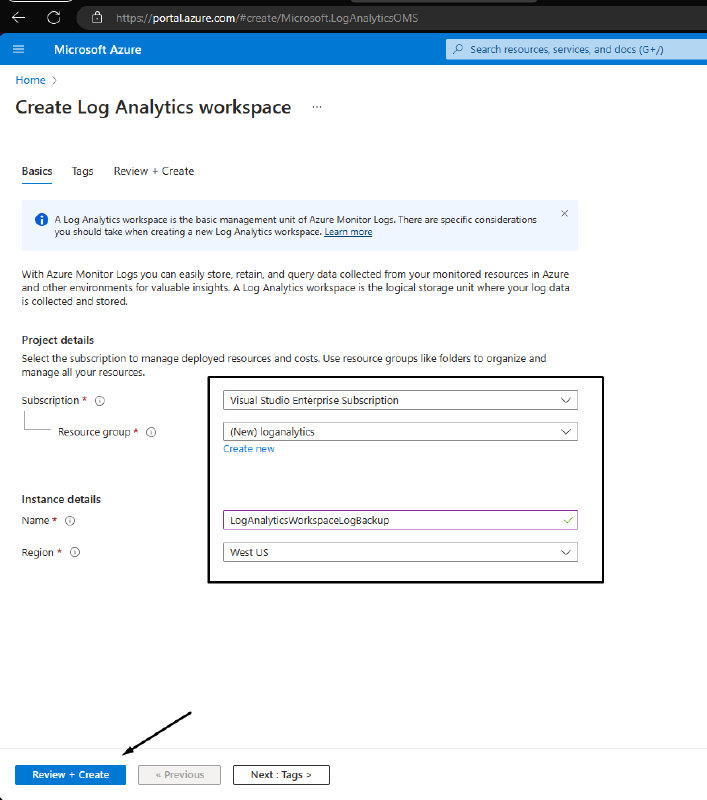
Examples of different command execution paths for Azure Virtual Machines and Virtual Machine Scale Sets.
Read More
Related rules
- Azure Arc Cluster Credential Access by Identity from Unusual Source
- Azure Service Principal Sign-In Followed by Arc Cluster Credential Access
- Azure Storage Account Keys Accessed by Privileged User
- Azure VM Extension CRUD Operation with Unusual Source ASN
- Azure VM Extension Deployment by User