Entra ID Unusual Cloud Device Registration
Detects a sequence of events in Microsoft Entra ID indicative of suspicious cloud-based device registration via automated
tooling like ROADtools or similar frameworks. This behavior involves adding a device via the Device Registration Service,
followed by the assignment of registered users and owners — a pattern consistent with techniques used to establish persistence or
acquire a Primary Refresh Token (PRT). ROADtools and similar tooling leave distinct telemetry signatures such as the
Microsoft.OData.Client user agent. These sequences are uncommon in typical user behavior and may reflect abuse of device
trust for session hijacking or silent token replay.
Elastic rule (View on GitHub)
  1[metadata]
  2creation_date = "2025/06/13"
  3integration = ["azure"]
  4maturity = "production"
  5updated_date = "2026/02/04"
  6
  7[rule]
  8author = ["Elastic"]
  9description = """
 10Detects a sequence of events in Microsoft Entra ID indicative of suspicious cloud-based device registration via automated
 11tooling like ROADtools or similar frameworks. This behavior involves adding a device via the Device Registration Service,
 12followed by the assignment of registered users and owners — a pattern consistent with techniques used to establish persistence or
 13acquire a Primary Refresh Token (PRT). ROADtools and similar tooling leave distinct telemetry signatures such as the
 14`Microsoft.OData.Client` user agent. These sequences are uncommon in typical user behavior and may reflect abuse of device
 15trust for session hijacking or silent token replay.
 16"""
 17from = "now-30m"
 18interval = "15m"
 19index = ["filebeat-*", "logs-azure.auditlogs-*"]
 20language = "eql"
 21license = "Elastic License v2"
 22name = "Entra ID Unusual Cloud Device Registration"
 23note = """## Triage and analysis
 24
 25### Investigating Entra ID Unusual Cloud Device Registration
 26
 27This rule detects a sequence of Microsoft Entra ID audit events consistent with cloud device registration abuse via ROADtools or similar automation frameworks. The activity includes three correlated events:
 28
 291. Add device operation from the Device Registration Service using suspicious user-agents (`Dsreg/*`, `DeviceRegistrationClient`, or `Microsoft.OData.Client/*`).
 302. Addition of a registered user with an `enterprise registration` URN.
 313. Assignment of a registered owner to the device.
 32
 33This pattern has been observed in OAuth phishing and PRT abuse campaigns where adversaries silently register a cloud device to obtain persistent, trusted access.
 34
 35### Possible investigation steps
 36
 37- Identify the user principal associated with the device registration.
 38- Review the `azure.auditlogs.identity` field to confirm the Device Registration Service initiated the request.
 39- Check the user-agent in `azure.auditlogs.properties.additional_details.value`. Known attack tooling signatures include:
 40  - `Dsreg/10.0 (Windows X.X.X)` - ROADtools Windows device registration
 41  - `DeviceRegistrationClient` - ROADtools MacOS/Android device registration
 42  - `Microsoft.OData.Client/*` - .NET-based tools or Graph SDK
 43- Examine the OS version in the modified properties to identify potentially suspicious or outdated versions.
 44- Verify the URN in the new value field (`urn:ms-drs:enterpriseregistration.windows.net`) is not being misused.
 45- Use `azure.correlation_id` to pivot across all three steps of the registration flow.
 46- Pivot to `azure.signinlogs` to detect follow-on activity using the new device, such as sign-ins involving refresh or primary refresh tokens.
 47- Look for signs of persistence or lateral movement enabled by the newly registered device.
 48- Identify the registered device name by reviewing `azure.auditlogs.properties.target_resources.0.display_name` and confirm it's expected for the user or organization.
 49- Use the correlation ID `azure.correlation_id` to pivot into registered user events from Entra ID audit logs and check `azure.auditlogs.properties.target_resources.0.user_principal_name` to identify the user associated with the device registration.
 50- Review any activity for this user from Entra ID sign-in logs, where the incoming token type is a `primaryRefreshToken`.
 51
 52### False positive analysis
 53
 54- Some MDM, autopilot provisioning flows, or third-party device management tools may generate similar sequences. Validate against known provisioning tools, expected rollout windows, and device inventory.
 55- Investigate whether the device name, OS version, and registration details align with normal IT workflows.
 56- Check if the user-agent corresponds to legitimate automation or tooling used by your organization.
 57
 58### Response and remediation
 59
 60- If confirmed malicious, remove the registered device from Entra ID.
 61- Revoke refresh tokens and primary refresh tokens associated with the user and device.
 62- Disable the user account and initiate password reset and identity verification procedures.
 63- Review audit logs and sign-in activity for additional indicators of persistence or access from the rogue device.
 64- Tighten conditional access policies to restrict device registration and enforce compliance or hybrid join requirements.
 65"""
 66references = [
 67    "https://www.volexity.com/blog/2025/04/22/phishing-for-codes-russian-threat-actors-target-microsoft-365-oauth-workflows/",
 68    "https://github.com/dirkjanm/ROADtools",
 69    "https://dirkjanm.io/introducing-roadtools-token-exchange-roadtx/"
 70]
 71risk_score = 47
 72rule_id = "90efea04-5675-11f0-8f80-f661ea17fbcd"
 73severity = "medium"
 74tags = [
 75    "Domain: Cloud",
 76    "Domain: Identity",
 77    "Data Source: Azure",
 78    "Data Source: Microsoft Entra ID",
 79    "Data Source: Microsoft Entra ID Audit Logs",
 80    "Use Case: Identity and Access Audit",
 81    "Tactic: Persistence",
 82    "Resources: Investigation Guide",
 83]
 84timestamp_override = "event.ingested"
 85type = "eql"
 86
 87query = '''
 88sequence by azure.correlation_id with maxspan=5m
 89[any where event.dataset == "azure.auditlogs" and
 90    azure.auditlogs.identity == "Device Registration Service" and
 91    azure.auditlogs.operation_name == "Add device" and
 92    (
 93        azure.auditlogs.properties.additional_details.value like "Microsoft.OData.Client/*" or
 94        azure.auditlogs.properties.additional_details.value like "Dsreg/*" or
 95        azure.auditlogs.properties.additional_details.value == "DeviceRegistrationClient"
 96    ) and
 97    `azure.auditlogs.properties.target_resources.0.modified_properties.1.display_name` == "CloudAccountEnabled" and
 98    `azure.auditlogs.properties.target_resources.0.modified_properties.1.new_value` == "[true]"]
 99[any where event.dataset == "azure.auditlogs" and
100    azure.auditlogs.operation_name == "Add registered users to device" and
101    `azure.auditlogs.properties.target_resources.0.modified_properties.2.new_value` like "*urn:ms-drs:enterpriseregistration.windows.net*"]
102[any where event.dataset == "azure.auditlogs" and
103    azure.auditlogs.operation_name == "Add registered owner to device"]
104'''
105
106
107[[rule.threat]]
108framework = "MITRE ATT&CK"
109[[rule.threat.technique]]
110id = "T1098"
111name = "Account Manipulation"
112reference = "https://attack.mitre.org/techniques/T1098/"
113[[rule.threat.technique.subtechnique]]
114id = "T1098.005"
115name = "Device Registration"
116reference = "https://attack.mitre.org/techniques/T1098/005/"
117
118
119
120[rule.threat.tactic]
121id = "TA0003"
122name = "Persistence"
123reference = "https://attack.mitre.org/tactics/TA0003/"
Triage and analysis
Investigating Entra ID Unusual Cloud Device Registration
This rule detects a sequence of Microsoft Entra ID audit events consistent with cloud device registration abuse via ROADtools or similar automation frameworks. The activity includes three correlated events:
- Add device operation from the Device Registration Service using suspicious user-agents (
Dsreg/*,DeviceRegistrationClient, orMicrosoft.OData.Client/*). - Addition of a registered user with an
enterprise registrationURN. - Assignment of a registered owner to the device.
This pattern has been observed in OAuth phishing and PRT abuse campaigns where adversaries silently register a cloud device to obtain persistent, trusted access.
Possible investigation steps
- Identify the user principal associated with the device registration.
- Review the
azure.auditlogs.identityfield to confirm the Device Registration Service initiated the request. - Check the user-agent in
azure.auditlogs.properties.additional_details.value. Known attack tooling signatures include:Dsreg/10.0 (Windows X.X.X)- ROADtools Windows device registrationDeviceRegistrationClient- ROADtools MacOS/Android device registrationMicrosoft.OData.Client/*- .NET-based tools or Graph SDK
- Examine the OS version in the modified properties to identify potentially suspicious or outdated versions.
- Verify the URN in the new value field (
urn:ms-drs:enterpriseregistration.windows.net) is not being misused. - Use
azure.correlation_idto pivot across all three steps of the registration flow. - Pivot to
azure.signinlogsto detect follow-on activity using the new device, such as sign-ins involving refresh or primary refresh tokens. - Look for signs of persistence or lateral movement enabled by the newly registered device.
- Identify the registered device name by reviewing
azure.auditlogs.properties.target_resources.0.display_nameand confirm it's expected for the user or organization. - Use the correlation ID
azure.correlation_idto pivot into registered user events from Entra ID audit logs and checkazure.auditlogs.properties.target_resources.0.user_principal_nameto identify the user associated with the device registration. - Review any activity for this user from Entra ID sign-in logs, where the incoming token type is a
primaryRefreshToken.
False positive analysis
- Some MDM, autopilot provisioning flows, or third-party device management tools may generate similar sequences. Validate against known provisioning tools, expected rollout windows, and device inventory.
- Investigate whether the device name, OS version, and registration details align with normal IT workflows.
- Check if the user-agent corresponds to legitimate automation or tooling used by your organization.
Response and remediation
- If confirmed malicious, remove the registered device from Entra ID.
- Revoke refresh tokens and primary refresh tokens associated with the user and device.
- Disable the user account and initiate password reset and identity verification procedures.
- Review audit logs and sign-in activity for additional indicators of persistence or access from the rogue device.
- Tighten conditional access policies to restrict device registration and enforce compliance or hybrid join requirements.
References
-

Since early March 2025, Volexity has observed multiple suspected Russian threat actors conducting highly targeted social engineering operations aimed at gaining access to the Microsoft 365 (M365) accounts of targeted individuals. This activity comes on the heels of attacks Volexity reported on back in February 2025, where Russian threat actors were discovered targeting users and organizations through Device Code Authentication phishing...
Read More -
A collection of Azure AD/Entra tools for offensive and defensive security purposes - dirkjanm/ROADtools
Read More -
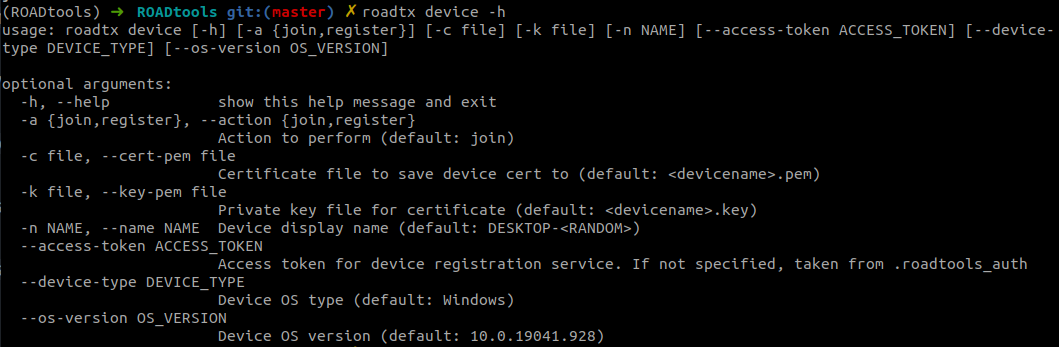
Ever since the initial release of ROADrecon and the ROADtools framework I have been adding new features to it, especially on the authentication side. As a result, it supports many forms of authentication, such as using Primary Refresh Tokens (PRTs), PRT cookies, and regular access/refresh tokens. The authentication modules are all part of the shared library roadlib, and can be used in other tools by importing the library. Even though you can request tokens for any Azure AD connected resource and with many client IDs, the only tool exposing this authentication part was ROADrecon. It always felt unnatural and illogical to tell people that you can use a recon tool to request tokens for many other purposes. So I decided to start writing a new tool, which resolves around requesting and using Azure AD tokens. As I was working on this, I started adding proof of concepts I wrote during my Azure AD devices research into the tool, adding support for registering devices and requesting Primary Refresh Tokens using device credentials. I also added various modules for injecting PRTs into browser sessions with Selenium, and for automating authentication with MFA. The result is a comprehensive tool called ROADtools Token eXchange, or simply roadtx. Currently it has the following capabilities:
Read More
Related rules
- Entra ID Global Administrator Role Assigned
- Entra ID MFA Disabled for User
- Entra ID ADRS Token Request by Microsoft Authentication Broker
- Entra ID Conditional Access Policy (CAP) Modified
- Entra ID Elevated Access to User Access Administrator