Okta AiTM Session Cookie Replay
Detects potential Adversary-in-the-Middle (AiTM) session cookie replay attacks against Okta. This rule identifies when an Okta session is used from multiple IP addresses or with suspicious non-browser user agents after initial authentication. AiTM attacks capture session cookies via phishing proxies (e.g., Evilginx, Modlishka) and replay them from attacker infrastructure, bypassing MFA. The detection correlates session start events with subsequent policy evaluations or SSO attempts that occur from different IPs or programmatic user agents.
Elastic rule (View on GitHub)
  1[metadata]
  2creation_date = "2026/01/26"
  3integration = ["okta"]
  4maturity = "production"
  5updated_date = "2026/03/24"
  6
  7[rule]
  8author = ["Elastic"]
  9description = """
 10Detects potential Adversary-in-the-Middle (AiTM) session cookie replay attacks against Okta. This rule identifies when
 11an Okta session is used from multiple IP addresses or with suspicious non-browser user agents after initial
 12authentication. AiTM attacks capture session cookies via phishing proxies (e.g., Evilginx, Modlishka) and replay them
 13from attacker infrastructure, bypassing MFA. The detection correlates session start events with subsequent policy
 14evaluations or SSO attempts that occur from different IPs or programmatic user agents.
 15"""
 16false_positives = [
 17    """
 18    Users legitimately switching networks (e.g., VPN connect/disconnect, office to home) may trigger IP-based detection.
 19    Review the geographic distance and time between IP changes to assess legitimacy.
 20    """,
 21    """
 22    Automated integrations or scripts using service accounts with session cookies may trigger user-agent based
 23    detection. Consider excluding known automation accounts by okta.actor.alternate_id.
 24    """,
 25    """
 26    Mobile users switching between WiFi and cellular may show IP address changes. Correlate with device type and typical
 27    user behavior patterns.
 28    """,
 29]
 30from = "now-30m"
 31language = "esql"
 32license = "Elastic License v2"
 33name = "Okta AiTM Session Cookie Replay"
 34note = """## Triage and analysis
 35
 36### Investigating Okta AiTM Session Cookie Replay
 37
 38Adversary-in-the-Middle (AiTM) attacks use reverse proxies to intercept authentication flows, capturing session cookies after victims complete MFA. Attackers then replay these cookies from their own infrastructure to hijack authenticated sessions. This rule detects the post-capture phase by identifying sessions used from anomalous contexts.
 39
 40This is an ES|QL aggregation-based rule. Pivot into raw events using the root session ID for full investigation context.
 41
 42### Possible investigation steps
 43
 44- Review the collected IP addresses from the alert to identify all IPs that accessed this session. Investigate geographic locations and ASN ownership for each IP.
 45- Examine the user agent values for non-browser user agents like `python-requests`, `curl`, or `Headless` browsers that indicate programmatic access.
 46- Check Okta's risk assessment fields. HIGH risk with reasons like "Anomalous Device" or "Anomalous Location" strengthens AiTM suspicion.
 47- Correlate the session start timestamp with the first replay attempt timestamp to understand the attack timeline.
 48- Query raw Okta events for the session ID to see all activity within this session, including accessed applications.
 49- Review proxy detection fields to determine if attacker requests originated from VPN/proxy infrastructure.
 50- Check the user's recent password reset or MFA enrollment events, as these may indicate account compromise leading to the AiTM attack.
 51- Contact the user to verify if they received phishing emails with links to suspicious login pages around the session start time.
 52
 53### False positive analysis
 54
 55- Legitimate VPN usage may cause IP address changes within a session. Check if both IPs belong to known corporate VPN ranges or the user's typical locations.
 56- Users traveling may show geographic IP changes. Correlate with travel schedules or expense reports if available.
 57- Browser extensions or security tools may modify user agents. Verify the user agent patterns match known tools in the environment.
 58- API integrations using user context may trigger non-browser UA detection. Exclude known service accounts.
 59
 60### Response and remediation
 61
 62- Immediately terminate all active sessions for the affected user via Okta Admin Console.
 63- Reset the user's password and require MFA re-enrollment to invalidate any captured credentials.
 64- Review and revoke any OAuth tokens or API keys associated with the user.
 65- Check Okta System Log for applications accessed during the suspicious session and assess data exposure.
 66- If downstream applications were accessed, coordinate with application owners to review access logs and potential data exfiltration.
 67- Block the attacker IP addresses at the network perimeter and add to threat intelligence feeds.
 68- Implement Okta sign-on policies that challenge or block sessions with HIGH risk scores or proxy detection.
 69- Consider enabling Okta ThreatInsight to automatically block known malicious IPs.
 70- Review email security logs for phishing attempts targeting the user around the session start time.
 71- Escalate to incident response if sensitive applications (AWS, Salesforce, email) were accessed from the attacker IP.
 72"""
 73references = [
 74    "https://www.bleepingcomputer.com/news/security/okta-sso-accounts-targeted-in-vishing-based-data-theft-attacks/",
 75    "https://reliaquest.com/blog/threat-spotlight-shinyhunters-data-breach-targets-salesforce-amid-scattered-spider-collaboration/",
 76    "https://securitylabs.datadoghq.com/articles/investigating-an-aitm-phishing-campaign-m365-okta/)",
 77    "https://www.microsoft.com/en-us/security/blog/2022/07/12/from-cookie-theft-to-bec-attackers-use-aitm-phishing-sites-as-entry-point-to-further-financial-fraud/",
 78    "https://www.elastic.co/security-labs/monitoring-okta-threats-with-elastic-security",
 79    "https://www.elastic.co/security-labs/starter-guide-to-understanding-okta",
 80]
 81risk_score = 73
 82rule_id = "9ed5d08f-aad6-4c03-838c-d686da887c2c"
 83severity = "high"
 84tags = [
 85    "Domain: Identity",
 86    "Use Case: Identity and Access Audit",
 87    "Data Source: Okta",
 88    "Data Source: Okta System Logs",
 89    "Tactic: Credential Access",
 90    "Tactic: Lateral Movement",
 91    "Resources: Investigation Guide",
 92
 93]
 94timestamp_override = "event.ingested"
 95type = "esql"
 96
 97query = '''
 98FROM logs-okta.system-*
 99
100// Filter to relevant event types for AiTM detection
101| WHERE
102    okta.event_type IN ("user.session.start", "policy.evaluate_sign_on", "user.authentication.sso") AND
103    okta.authentication_context.root_session_id IS NOT NULL AND
104    okta.actor.alternate_id != "system@okta.com"
105
106// Create event type flags
107| EVAL Esql.is_session_start = okta.event_type == "user.session.start"
108| EVAL Esql.is_policy_eval = okta.event_type == "policy.evaluate_sign_on"
109| EVAL Esql.is_sso = okta.event_type == "user.authentication.sso"
110| EVAL Esql.is_replay_event = Esql.is_policy_eval OR Esql.is_sso
111
112// Flag suspicious non-browser user agents
113| EVAL Esql.is_suspicious_ua =
114    user_agent.original LIKE "python-requests*" OR
115    user_agent.original LIKE "curl/*" OR
116    user_agent.original LIKE "httpx*" OR
117    user_agent.original LIKE "aiohttp*" OR
118    user_agent.original LIKE "Go-http-client*" OR
119    user_agent.original LIKE "*Headless*" OR
120    user_agent.original LIKE "Java/*" OR
121    user_agent.original LIKE "okhttp*"
122
123// Aggregate by session
124| STATS
125    Esql.session_start_count = SUM(CASE(Esql.is_session_start, 1, 0)),
126    Esql.replay_event_count = SUM(CASE(Esql.is_replay_event, 1, 0)),
127    Esql.session_start_time = MIN(CASE(Esql.is_session_start, @timestamp, null)),
128    Esql.first_replay_time = MIN(CASE(Esql.is_replay_event, @timestamp, null)),
129    Esql.last_replay_time = MAX(CASE(Esql.is_replay_event, @timestamp, null)),
130    Esql.session_start_ip = MAX(CASE(Esql.is_session_start, okta.client.ip, null)),
131    Esql.session_start_ua = MAX(CASE(Esql.is_session_start, user_agent.original, null)),
132    Esql.suspicious_ua_count = SUM(CASE(Esql.is_suspicious_ua, 1, 0)),
133    Esql.okta_client_ip_count_distinct = COUNT_DISTINCT(okta.client.ip),
134    Esql.user_agent_count_distinct = COUNT_DISTINCT(user_agent.original),
135    Esql.okta_client_ip_values = VALUES(okta.client.ip),
136    Esql.user_agent_values = VALUES(user_agent.original),
137    Esql.okta_event_type_values = VALUES(okta.event_type),
138    Esql.okta_outcome_result_values = VALUES(okta.outcome.result),
139    Esql.source_geo_country_name_values = VALUES(source.geo.country_name),
140    Esql.source_geo_city_name_values = VALUES(source.geo.city_name),
141    Esql.okta_debug_context_debug_data_risk_level_values = VALUES(okta.debug_context.debug_data.risk_level),
142    Esql.okta_debug_context_debug_data_risk_reasons_values = VALUES(okta.debug_context.debug_data.risk_reasons)
143  BY okta.authentication_context.root_session_id, okta.actor.alternate_id
144
145// Detection conditions
146| WHERE
147    Esql.session_start_count >= 1
148    AND Esql.replay_event_count >= 1
149    AND Esql.first_replay_time > Esql.session_start_time
150    AND (
151            (
152                Esql.okta_client_ip_count_distinct > 1 OR Esql.user_agent_count_distinct > 1
153            ) AND Esql.suspicious_ua_count > 0
154        )
155
156| SORT Esql.session_start_time DESC
157| KEEP Esql.*, okta.authentication_context.root_session_id, okta.actor.alternate_id
158'''
159
160
161[[rule.threat]]
162framework = "MITRE ATT&CK"
163
164[[rule.threat.technique]]
165id = "T1539"
166name = "Steal Web Session Cookie"
167reference = "https://attack.mitre.org/techniques/T1539/"
168
169[rule.threat.tactic]
170id = "TA0006"
171name = "Credential Access"
172reference = "https://attack.mitre.org/tactics/TA0006/"
173
174[[rule.threat]]
175framework = "MITRE ATT&CK"
176
177[[rule.threat.technique]]
178id = "T1550"
179name = "Use Alternate Authentication Material"
180reference = "https://attack.mitre.org/techniques/T1550/"
181
182[[rule.threat.technique.subtechnique]]
183id = "T1550.004"
184name = "Web Session Cookie"
185reference = "https://attack.mitre.org/techniques/T1550/004/"
186
187[rule.threat.tactic]
188id = "TA0005"
189name = "Defense Evasion"
190reference = "https://attack.mitre.org/tactics/TA0005/"
Triage and analysis
Investigating Okta AiTM Session Cookie Replay
Adversary-in-the-Middle (AiTM) attacks use reverse proxies to intercept authentication flows, capturing session cookies after victims complete MFA. Attackers then replay these cookies from their own infrastructure to hijack authenticated sessions. This rule detects the post-capture phase by identifying sessions used from anomalous contexts.
This is an ES|QL aggregation-based rule. Pivot into raw events using the root session ID for full investigation context.
Possible investigation steps
- Review the collected IP addresses from the alert to identify all IPs that accessed this session. Investigate geographic locations and ASN ownership for each IP.
- Examine the user agent values for non-browser user agents like
python-requests,curl, orHeadlessbrowsers that indicate programmatic access. - Check Okta's risk assessment fields. HIGH risk with reasons like "Anomalous Device" or "Anomalous Location" strengthens AiTM suspicion.
- Correlate the session start timestamp with the first replay attempt timestamp to understand the attack timeline.
- Query raw Okta events for the session ID to see all activity within this session, including accessed applications.
- Review proxy detection fields to determine if attacker requests originated from VPN/proxy infrastructure.
- Check the user's recent password reset or MFA enrollment events, as these may indicate account compromise leading to the AiTM attack.
- Contact the user to verify if they received phishing emails with links to suspicious login pages around the session start time.
False positive analysis
- Legitimate VPN usage may cause IP address changes within a session. Check if both IPs belong to known corporate VPN ranges or the user's typical locations.
- Users traveling may show geographic IP changes. Correlate with travel schedules or expense reports if available.
- Browser extensions or security tools may modify user agents. Verify the user agent patterns match known tools in the environment.
- API integrations using user context may trigger non-browser UA detection. Exclude known service accounts.
Response and remediation
- Immediately terminate all active sessions for the affected user via Okta Admin Console.
- Reset the user's password and require MFA re-enrollment to invalidate any captured credentials.
- Review and revoke any OAuth tokens or API keys associated with the user.
- Check Okta System Log for applications accessed during the suspicious session and assess data exposure.
- If downstream applications were accessed, coordinate with application owners to review access logs and potential data exfiltration.
- Block the attacker IP addresses at the network perimeter and add to threat intelligence feeds.
- Implement Okta sign-on policies that challenge or block sessions with HIGH risk scores or proxy detection.
- Consider enabling Okta ThreatInsight to automatically block known malicious IPs.
- Review email security logs for phishing attempts targeting the user around the session start time.
- Escalate to incident response if sensitive applications (AWS, Salesforce, email) were accessed from the attacker IP.
References
-

Okta is warning about custom phishing kits built specifically for voice-based social engineering (vishing) attacks. BleepingComputer has learned that these kits are being used in active attacks to steal Okta SSO credentials for data theft.
Read More -
ShinyHunters return with high-profile phishing attacks on Salesforce. ReliaQuest examines their tactics, collaboration theories, and future targets.
Read More -
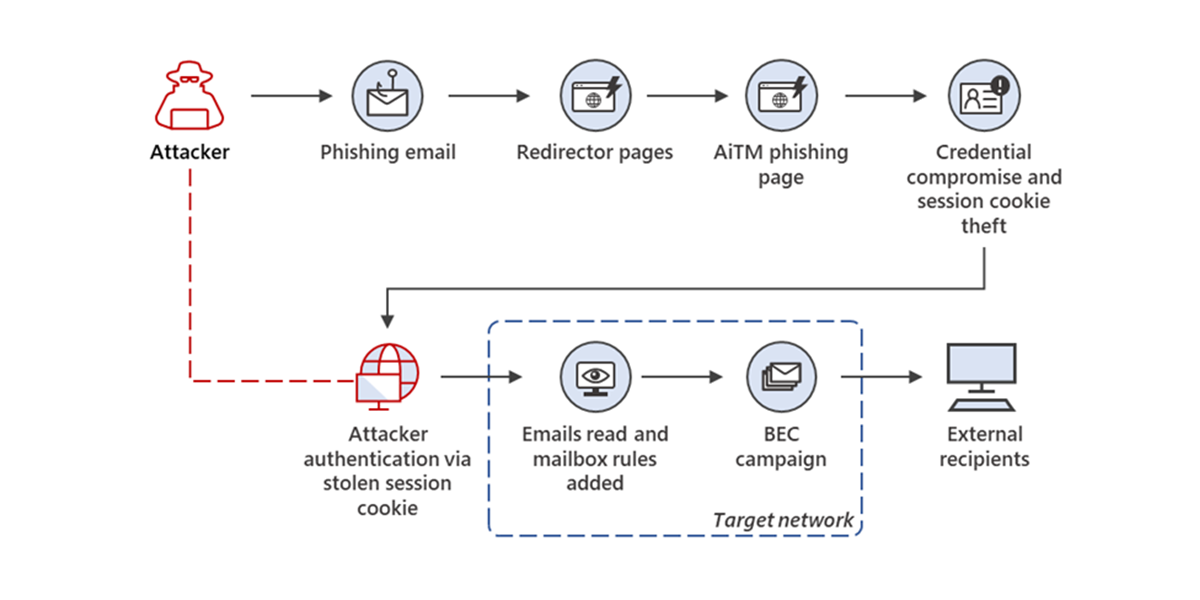
A large-scale phishing campaign that attempted to target over 10,000 organizations since September 2021 used adversary-in-the-middle (AiTM) phishing sites to steal passwords, hijack a user’s sign-in session, and skip the authentication process, even if the user had enabled multifactor authentication (MFA).
Read More -

This article guides readers through establishing an Okta threat detection lab, emphasizing the importance of securing SaaS platforms like Okta. It details creating a lab environment with the Elastic Stack, integrating SIEM solutions, and Okta.
Read More -

This article delves into Okta's architecture and services, laying a solid foundation for threat research and detection engineering. Essential reading for those aiming to master threat hunting and detection in Okta environments.
Read More
Related rules
- Okta Multiple OS Names Detected for a Single DT Hash
- Suspicious Kerberos Authentication Ticket Request
- Entra ID Actor Token User Impersonation Abuse
- Entra ID Federated Identity Credential Issuer Modified
- Potential Execution via SSH Backdoor