Potential Tunneling via AWS IoT Secure Tunneling Localproxy
Identifies AWS IoT Secure Tunneling localproxy started in destination mode that then resolves and connects to the
Secure Tunneling data plane, data.tunneling.iot.
Elastic rule (View on GitHub)
  1[metadata]
  2creation_date = "2026/09/18"
  3integration = ["endpoint"]
  4maturity = "production"
  5min_stack_comments = "DNS for Linux support was introduced in 9.3.0"
  6min_stack_version = "9.3.0"
  7updated_date = "2026/09/18"
  8
  9[rule]
 10author = ["Elastic"]
 11description = """
 12Identifies AWS IoT Secure Tunneling localproxy started in destination mode that then resolves and connects to the
 13Secure Tunneling data plane, data.tunneling.iot.<region>.amazonaws.com, on TCP/443. Destination mode opens no
 14listener; once the operator joins the tunnel the proxy forwards streams to a local service such as SSH on 127.0.0.1:22.
 15Public red-team research shows this signed, documented binary used as post-exploitation C2 that resembles legitimate
 16IoT device management. OpenTunnel and access tokens live in the operator's AWS account, not the victim's.
 17"""
 18false_positives = [
 19    """
 20    Support engineers and IoT operators may run localproxy on field devices or jump hosts that legitimately use AWS IoT
 21    Secure Tunneling. Confirm the host is an approved device-management asset, the parent process and binary path are
 22    expected, and the destination mapping points at an authorized local service. Allowlist by host, user, or signed
 23    install path where that use is documented.
 24    """,
 25]
 26from = "now-9m"
 27index = ["logs-endpoint.events.network-*", "logs-endpoint.events.process-*"]
 28language = "eql"
 29license = "Elastic License v2"
 30name = "Potential Tunneling via AWS IoT Secure Tunneling Localproxy"
 31note = """## Triage and analysis
 32
 33### Investigating Potential Tunneling via AWS IoT Secure Tunneling Localproxy
 34
 35AWS IoT Secure Tunneling's open-source `localproxy` creates a bidirectional relay through AWS-managed infrastructure. Destination mode (typical on the victim) makes an outbound connection to `data.tunneling.iot.<region>.amazonaws.com` on 443 using WebSocket subprotocol `aws.iot.securetunneling-3.0` and then connects to a local service (`-d localhost:22`, `-d SSH=localhost:22`, or a Unix socket). Source mode opens a loopback listener on the operator workstation, not on the compromised host. `OpenTunnel` is written to the operator's CloudTrail, not the target's.
 36
 37This is post-exploitation C2 / remote access after code execution, not initial access. The official binary is the expected implant. This rule requires three events from the same process: a destination-mode start (`-d` / `--destination-app`, or `-m dst` with mappings from `--config-dir`), DNS to the Secure Tunneling data plane, and TCP/443 egress. Elastic Defend often leaves `destination.domain` empty on the 443 flow, so the third event keys on port 443. Source mode (`-s`) is the operator workstation. Hosts that egress through a web proxy (`HTTPS_PROXY`) resolve and connect via the proxy using HTTP CONNECT, so the DNS and 443 events are not attributed to `localproxy` and this sequence will not fire there.
 38
 39### Possible investigation steps
 40
 41- Confirm destination mode from the command line: `-d` / `--destination-app`, or `-m` / `--mode` with `dst` / `destination` (mappings then come from `--config-dir`). Short flags are case-sensitive (`-d` is not `sshd -D`).
 42- Event 2 is DNS to `data.tunneling.iot.<region>.amazonaws.com`. Event 3 is TCP/443 from the same `process.entity_id` (`destination.domain` may be empty).
 43- Check what rode the tunnel: look for `connection_attempted` from the same `process.entity_id` to `127.0.0.1` or `::1` (typically port 22) during the process lifetime. An idle tunnel has none; a dummy or expired token stops after the 443 handshake.
 44- Treat `-t` / `--access-token` on the command line as a leaked one-time tunnel token. `AWSIOT_TUNNEL_ACCESS_TOKEN` is often passed via the environment and is not present on the `localproxy` start event (`process.env_vars` is typically empty).
 45- Review the parent process, user, and binary path. The AWS-published proxy is not statically linked and is commonly dropped as `localproxy` / `localproxy.exe`, run from a user-writable directory, or launched from `public.ecr.aws/aws-iot-securetunneling-localproxy/*`.
 46- Hunt for the same hash, path, argument pattern, or tunneling hostname on other hosts. A renamed binary still often carries `-d` plus an AWS region or `*tunneling.iot*` endpoint. If this sequence did not fire, hunt destination-mode localproxy process starts directly; web-proxy hosts will show neither the DNS nor the 443 event from the process.
 47- Do not expect `iotsecuretunneling:OpenTunnel` in the victim account. If the host is in AWS, VPC flow logs and resolver query logs may still show egress to the tunneling endpoint.
 48
 49### False positive analysis
 50
 51- Approved AWS IoT device troubleshooting uses this exact binary and flags. Restrict exceptions to known device fleets or jump hosts rather than the process name alone.
 52- Lab or red-team use of the aws-samples localproxy will look identical to abuse. Confirm against engagement records.
 53
 54### Response and remediation
 55
 56- If unauthorized: isolate the host, terminate `localproxy`, and block `*.tunneling.iot.*.amazonaws.com` at DNS or egress. That hostname is specific to Secure Tunneling and does not break IoT Core MQTT, Jobs, or Greengrass.
 57- Remove dropped binaries, container images, config files (`--config`, `--config-dir`), and any persistence that relaunches the proxy. Tokens are one-time and expire with the tunnel (published maximum 12 hours).
 58- Hunt for what rode the tunnel (SSH, other mapped services) using local connection history during the process lifetime.
 59- Organizations that do not use Secure Tunneling should block the data-plane hostname and keep this rule enabled without exceptions.
 60"""
 61references = [
 62    "https://hackerhermanos.com/posts/aws-iot-secure-tunneling-red-teamer/",
 63    "https://github.com/aws-samples/aws-iot-securetunneling-localproxy",
 64    "https://docs.aws.amazon.com/iot/latest/developerguide/local-proxy.html",
 65]
 66risk_score = 73
 67rule_id = "deab559f-f3ab-4ce3-b17c-8f70c4169fd6"
 68setup = """## Setup
 69
 70This rule is designed for data generated by [Elastic Defend](https://www.elastic.co/security/endpoint-security), which provides native endpoint detection and response, along with event enrichments designed to work with our detection rules.
 71
 72Setup instructions: https://ela.st/install-elastic-defend
 73
 74Linux DNS events from Elastic Defend require Elastic Stack 9.3.0 or later.
 75"""
 76severity = "high"
 77tags = [
 78    "Domain: Endpoint",
 79    "Domain: Network",
 80    "Domain: OT/IoT",
 81    "OS: Windows",
 82    "OS: Linux",
 83    "OS: macOS",
 84    "Platform: Windows",
 85    "Platform: Linux",
 86    "Platform: macOS",
 87    "Platform: AWS",
 88    "Use Case: Threat Detection",
 89    "Tactic: Command and Control",
 90    "Data Source: Elastic Defend",
 91    "Service: AWS IoT",
 92    "Rule Type: Event Correlation (EQL)",
 93    "Resources: Investigation Guide",
 94]
 95timestamp_override = "event.ingested"
 96type = "eql"
 97
 98query = '''
 99sequence by process.entity_id with maxspan=5m
100  [process where event.type == "start" and event.action in ("exec", "exec_event", "start") and
101    (
102      process.args in ("-d", "--destination-app") or
103      (process.args in ("-m", "--mode") and process.args in ("dst", "destination")) or
104      process.args like ("--mode=dst", "--mode=destination")
105    ) and
106    (
107      /* Official binary, container image path, or Windows original filename */
108      (
109        process.name like~ ("localproxy", "localproxy.exe") or
110        ?process.pe.original_file_name like~ "localproxy.exe" or
111        process.executable like~ "*aws-iot-securetunneling-localproxy*"
112      ) or
113      /* Renamed binary: dest mode plus AWS region or tunneling endpoint */
114      (
115        (
116          process.args regex """[a-z]{2}(-[a-z]+)+-[0-9]+""" or
117          process.args in ("-e", "--proxy-endpoint", "-r", "--region") or
118          process.args like~ "*tunneling.iot*"
119        ) and
120        process.args in (
121          "-t", "--access-token",
122          "-c", "--capath",
123          "-b", "--local-bind-address",
124          "-m", "--mode"
125        ) and
126        not process.name like~ (
127          "timeout", "time", "env", "nice", "nohup", "stdbuf",
128          "bash", "dash", "sh", "zsh", "sudo", "sshd", "useradd"
129        )
130      )
131    )]
132  [network where event.action in ("lookup_requested", "lookup_result") and
133    dns.question.name like~ (
134      "data.tunneling.iot.*.amazonaws.com",
135      "data.tunneling.iot.*.amazonaws.com.cn"
136    )]
137  [network where event.action == "connection_attempted" and destination.port == 443]
138'''
139
140[rule.investigation_fields]
141field_names = [
142    "@timestamp",
143    "host.name",
144    "user.name",
145    "process.name",
146    "process.executable",
147    "process.command_line",
148    "process.parent.name",
149    "destination.address",
150    "destination.port",
151    "dns.question.name",
152]
153
154[[rule.threat]]
155framework = "MITRE ATT&CK"
156[[rule.threat.technique]]
157id = "T1071"
158name = "Application Layer Protocol"
159reference = "https://attack.mitre.org/techniques/T1071/"
160[[rule.threat.technique.subtechnique]]
161id = "T1071.001"
162name = "Web Protocols"
163reference = "https://attack.mitre.org/techniques/T1071/001/"
164
165
166[[rule.threat.technique]]
167id = "T1090"
168name = "Proxy"
169reference = "https://attack.mitre.org/techniques/T1090/"
170[[rule.threat.technique.subtechnique]]
171id = "T1090.002"
172name = "External Proxy"
173reference = "https://attack.mitre.org/techniques/T1090/002/"
174
175
176[[rule.threat.technique]]
177id = "T1572"
178name = "Protocol Tunneling"
179reference = "https://attack.mitre.org/techniques/T1572/"
180
181
182[rule.threat.tactic]
183id = "TA0011"
184name = "Command and Control"
185reference = "https://attack.mitre.org/tactics/TA0011/"
Triage and analysis
Investigating Potential Tunneling via AWS IoT Secure Tunneling Localproxy
AWS IoT Secure Tunneling's open-source localproxy creates a bidirectional relay through AWS-managed infrastructure. Destination mode (typical on the victim) makes an outbound connection to data.tunneling.iot.<region>.amazonaws.com on 443 using WebSocket subprotocol aws.iot.securetunneling-3.0 and then connects to a local service (-d localhost:22, -d SSH=localhost:22, or a Unix socket). Source mode opens a loopback listener on the operator workstation, not on the compromised host. OpenTunnel is written to the operator's CloudTrail, not the target's.
This is post-exploitation C2 / remote access after code execution, not initial access. The official binary is the expected implant. This rule requires three events from the same process: a destination-mode start (-d / --destination-app, or -m dst with mappings from --config-dir), DNS to the Secure Tunneling data plane, and TCP/443 egress. Elastic Defend often leaves destination.domain empty on the 443 flow, so the third event keys on port 443. Source mode (-s) is the operator workstation. Hosts that egress through a web proxy (HTTPS_PROXY) resolve and connect via the proxy using HTTP CONNECT, so the DNS and 443 events are not attributed to localproxy and this sequence will not fire there.
Possible investigation steps
- Confirm destination mode from the command line:
-d/--destination-app, or-m/--modewithdst/destination(mappings then come from--config-dir). Short flags are case-sensitive (-dis notsshd -D). - Event 2 is DNS to
data.tunneling.iot.<region>.amazonaws.com. Event 3 is TCP/443 from the sameprocess.entity_id(destination.domainmay be empty). - Check what rode the tunnel: look for
connection_attemptedfrom the sameprocess.entity_idto127.0.0.1or::1(typically port 22) during the process lifetime. An idle tunnel has none; a dummy or expired token stops after the 443 handshake. - Treat
-t/--access-tokenon the command line as a leaked one-time tunnel token.AWSIOT_TUNNEL_ACCESS_TOKENis often passed via the environment and is not present on thelocalproxystart event (process.env_varsis typically empty). - Review the parent process, user, and binary path. The AWS-published proxy is not statically linked and is commonly dropped as
localproxy/localproxy.exe, run from a user-writable directory, or launched frompublic.ecr.aws/aws-iot-securetunneling-localproxy/*. - Hunt for the same hash, path, argument pattern, or tunneling hostname on other hosts. A renamed binary still often carries
-dplus an AWS region or*tunneling.iot*endpoint. If this sequence did not fire, hunt destination-mode localproxy process starts directly; web-proxy hosts will show neither the DNS nor the 443 event from the process. - Do not expect
iotsecuretunneling:OpenTunnelin the victim account. If the host is in AWS, VPC flow logs and resolver query logs may still show egress to the tunneling endpoint.
False positive analysis
- Approved AWS IoT device troubleshooting uses this exact binary and flags. Restrict exceptions to known device fleets or jump hosts rather than the process name alone.
- Lab or red-team use of the aws-samples localproxy will look identical to abuse. Confirm against engagement records.
Response and remediation
- If unauthorized: isolate the host, terminate
localproxy, and block*.tunneling.iot.*.amazonaws.comat DNS or egress. That hostname is specific to Secure Tunneling and does not break IoT Core MQTT, Jobs, or Greengrass. - Remove dropped binaries, container images, config files (
--config,--config-dir), and any persistence that relaunches the proxy. Tokens are one-time and expire with the tunnel (published maximum 12 hours). - Hunt for what rode the tunnel (SSH, other mapped services) using local connection history during the process lifetime.
- Organizations that do not use Secure Tunneling should block the data-plane hostname and keep this rule enabled without exceptions.
References
-
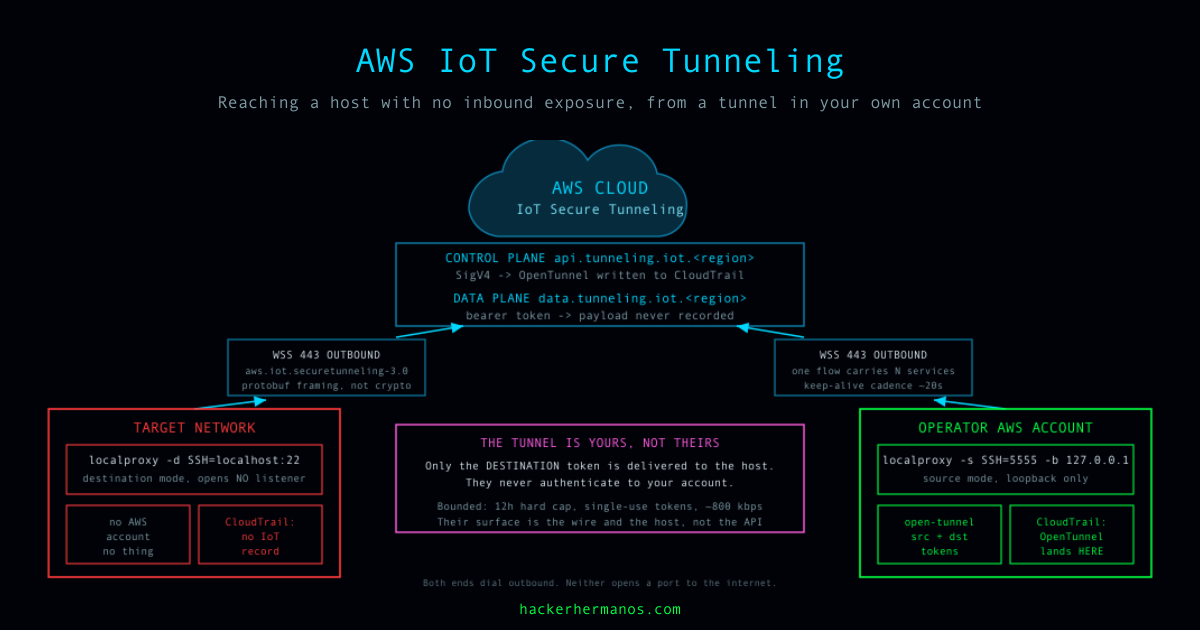
AWS IoT Secure Tunneling reaches a host inside a target network from a tunnel in the operator's own AWS account, with no control-plane record in the target's.
Read More -
AWS Iot Secure Tunneling local proxy reference C++ implementation - aws-samples/aws-iot-securetunneling-localproxy
Read More -
The local proxy transmits data sent by the application running on the source device by using secure tunneling over a WebSocket secure connection. You can download the local proxy source from GitHub .
Read More
Related rules
- FortiGate SOCKS Traffic from an Unusual Process
- PANW and Elastic Defend - Command and Control Correlation
- Suricata and Elastic Defend Network Correlation
- Network Connection to OAST Domain via Script Interpreter
- Curl or Wget Spawned via Node.js