File Download Detected via Defend for Containers
This rule detects the download of files from inside a container. The files are downloaded using the "curl" or "wget" command-line tools. Adversaries may use these tools to download files from the internet to gain access to sensitive data or communicate with C2 servers.
Elastic rule (View on GitHub)
  1[metadata]
  2creation_date = "2026/02/06"
  3integration = ["cloud_defend"]
  4maturity = "production"
  5min_stack_comments = "Defend for Containers integration was re-introduced in 9.3.0"
  6min_stack_version = "9.3.0"
  7updated_date = "2026/03/24"
  8
  9[rule]
 10author = ["Elastic"]
 11description = """
 12This rule detects the download of files from inside a container. The files are downloaded using the "curl" or
 13"wget" command-line tools. Adversaries may use these tools to download files from the internet to gain access to
 14sensitive data or communicate with C2 servers.
 15"""
 16false_positives = [
 17    """
 18    There is a potential for false positives if the files are downloaded for legitimate purposes, such as debugging or
 19    troubleshooting, or if the files are downloaded from a known benign source. It is important to investigate any
 20    alerts generated by this rule to determine if they are indicative of malicious activity or part of legitimate
 21    container activity.
 22    """,
 23]
 24from = "now-6m"
 25index = ["logs-cloud_defend.process*"]
 26interval = "5m"
 27language = "eql"
 28license = "Elastic License v2"
 29name = "File Download Detected via Defend for Containers"
 30note = """## Triage and analysis
 31
 32> **Disclaimer**:
 33> This investigation guide was created using generative AI technology and has been reviewed to improve its accuracy and relevance. While every effort has been made to ensure its quality, we recommend validating the content and adapting it to suit your specific environment and operational needs.
 34
 35### Investigating File Download Detected via Defend for Containers
 36
 37This rule flags an interactive session inside a Linux container that runs curl or wget to pull content from a URL or IP and immediately writes a new file, signaling hands-on retrieval of tools, payloads, or data. It matters because attackers often use on-demand downloads to stage second-phase execution and establish application-layer command-and-control without baking artifacts into images. A common pattern is an operator execing into a running container, fetching a script or binary from paste/CDN infrastructure, then saving it for rapid follow-on execution.
 38
 39### Possible investigation steps
 40
 41- Attribute the interactive session to an initiator by correlating the container exec/attach event with Kubernetes audit logs or Docker daemon logs to identify the user/service account, source IP, and access path.
 42- Inspect the created file’s full path, size, magic/format, and hash, then retrieve it from the container or node filesystem for static analysis and malware scanning.
 43- Pivot on the download destination (domain/IP/URL path) to review outbound connection telemetry, DNS/TLS indicators, and threat reputation, and determine whether the endpoint is expected for this workload.
 44- Review subsequent container activity after the download for follow-on actions such as chmod, interpreter execution, new processes, cron modifications, credential access, or lateral movement attempts.
 45- Validate whether the container/image and namespace normally permit interactive access and external downloads, and if not, assess for compromised credentials, exposed exec permissions, or a misconfigured runtime policy.
 46
 47### False positive analysis
 48
 49- A developer or SRE may exec into a running container for interactive troubleshooting and use curl or wget to fetch a diagnostic script, configuration file, or test payload from an internal HTTP endpoint, resulting in a new file creation event.
 50- An operator may interactively run curl or wget to download a patch, certificate bundle, or updated artifact into the container during an emergency fix or recovery workflow, especially in minimal images lacking package managers, which can appear indistinguishable from attacker staging.
 51
 52### Response and remediation
 53
 54- Immediately isolate the affected pod/container by applying a deny-all egress policy and, if possible, pausing or cordoning the hosting node to stop additional downloads and outbound C2 traffic.
 55- Capture and preserve the downloaded artifact(s) created by curl/wget (path, timestamps, hashes) plus the interactive shell history/command line, then delete the file(s) from the container and revoke any injected tools or scripts.
 56- Terminate the interactive session and rotate credentials used to exec/attach (Kubernetes user/service account tokens, kubeconfig, SSH keys) and invalidate any newly created access (added users, API tokens, or modified secrets/config).
 57- Redeploy the workload from a known-good image and configuration, then scan the node and cluster for persistence or reuse of the same URL/IP and hashes across other containers, blocking them at egress and proxy/IDS.
 58- Escalate to incident response immediately if the downloaded file is executed, connects to an unapproved external host, modifies startup paths (entrypoint/cron), or if the exec user is unknown or high-privileged.
 59- Harden by removing exec/attach permissions from non-admin roles, enforcing runtime policies that block interactive curl/wget and restrict outbound traffic to approved destinations, and ensuring images include required tools so ad-hoc downloads are unnecessary."""
 60references = [
 61    "https://heilancoos.github.io/research/2025/12/16/kubernetes.html#kubelet-api",
 62    "https://www.cyberark.com/resources/threat-research-blog/using-kubelet-client-to-attack-the-kubernetes-cluster",
 63    "https://www.aquasec.com/blog/kubernetes-exposed-exploiting-the-kubelet-api/"
 64]
 65risk_score = 47
 66rule_id = "a8b08d2d-6dfe-453f-87d1-11d5fc3ec746"
 67severity = "medium"
 68tags = [
 69    "Data Source: Elastic Defend for Containers",
 70    "Domain: Container",
 71    "OS: Linux",
 72    "Use Case: Threat Detection",
 73    "Tactic: Command and Control",
 74    "Tactic: Execution",
 75    "Resources: Investigation Guide",
 76]
 77timestamp_override = "event.ingested"
 78type = "eql"
 79query = '''
 80process where host.os.type == "linux" and event.type == "start" and event.action == "exec" and process.interactive == true and (
 81  (
 82    (process.name == "curl" or process.args in ("curl", "/bin/curl", "/usr/bin/curl", "/usr/local/bin/curl")) and
 83    process.args in ("-o", "-O", "--output", "--remote-name", "--remote-name-all", "--output-dir")
 84  ) or
 85  (
 86    (process.name == "wget" or process.args in ("wget", "/bin/wget", "/usr/bin/wget", "/usr/local/bin/wget")) and
 87    process.args like ("-*O*", "--output-document=*", "--output-file=*")
 88  )
 89) and (
 90 process.args like~ "*http*" or
 91 process.args regex~ ".*[0-9]{1,3}\\.[0-9]{1,3}\\.[0-9]{1,3}\\.[0-9]{1,3}[:/]{1}.*"
 92) and container.id like "?*"
 93'''
 94
 95[[rule.threat]]
 96framework = "MITRE ATT&CK"
 97
 98[[rule.threat.technique]]
 99id = "T1071"
100name = "Application Layer Protocol"
101reference = "https://attack.mitre.org/techniques/T1071/"
102
103[[rule.threat.technique.subtechnique]]
104id = "T1071.001"
105name = "Web Protocols"
106reference = "https://attack.mitre.org/techniques/T1071/001/"
107
108[[rule.threat.technique]]
109id = "T1105"
110name = "Ingress Tool Transfer"
111reference = "https://attack.mitre.org/techniques/T1105/"
112
113[rule.threat.tactic]
114id = "TA0011"
115name = "Command and Control"
116reference = "https://attack.mitre.org/tactics/TA0011/"
117
118[[rule.threat]]
119framework = "MITRE ATT&CK"
120
121[[rule.threat.technique]]
122id = "T1059"
123name = "Command and Scripting Interpreter"
124reference = "https://attack.mitre.org/techniques/T1059/"
125
126[[rule.threat.technique.subtechnique]]
127id = "T1059.004"
128name = "Unix Shell"
129reference = "https://attack.mitre.org/techniques/T1059/004/"
130
131[rule.threat.tactic]
132id = "TA0002"
133name = "Execution"
134reference = "https://attack.mitre.org/tactics/TA0002/"
Triage and analysis
Disclaimer: This investigation guide was created using generative AI technology and has been reviewed to improve its accuracy and relevance. While every effort has been made to ensure its quality, we recommend validating the content and adapting it to suit your specific environment and operational needs.
Investigating File Download Detected via Defend for Containers
This rule flags an interactive session inside a Linux container that runs curl or wget to pull content from a URL or IP and immediately writes a new file, signaling hands-on retrieval of tools, payloads, or data. It matters because attackers often use on-demand downloads to stage second-phase execution and establish application-layer command-and-control without baking artifacts into images. A common pattern is an operator execing into a running container, fetching a script or binary from paste/CDN infrastructure, then saving it for rapid follow-on execution.
Possible investigation steps
- Attribute the interactive session to an initiator by correlating the container exec/attach event with Kubernetes audit logs or Docker daemon logs to identify the user/service account, source IP, and access path.
- Inspect the created file’s full path, size, magic/format, and hash, then retrieve it from the container or node filesystem for static analysis and malware scanning.
- Pivot on the download destination (domain/IP/URL path) to review outbound connection telemetry, DNS/TLS indicators, and threat reputation, and determine whether the endpoint is expected for this workload.
- Review subsequent container activity after the download for follow-on actions such as chmod, interpreter execution, new processes, cron modifications, credential access, or lateral movement attempts.
- Validate whether the container/image and namespace normally permit interactive access and external downloads, and if not, assess for compromised credentials, exposed exec permissions, or a misconfigured runtime policy.
False positive analysis
- A developer or SRE may exec into a running container for interactive troubleshooting and use curl or wget to fetch a diagnostic script, configuration file, or test payload from an internal HTTP endpoint, resulting in a new file creation event.
- An operator may interactively run curl or wget to download a patch, certificate bundle, or updated artifact into the container during an emergency fix or recovery workflow, especially in minimal images lacking package managers, which can appear indistinguishable from attacker staging.
Response and remediation
- Immediately isolate the affected pod/container by applying a deny-all egress policy and, if possible, pausing or cordoning the hosting node to stop additional downloads and outbound C2 traffic.
- Capture and preserve the downloaded artifact(s) created by curl/wget (path, timestamps, hashes) plus the interactive shell history/command line, then delete the file(s) from the container and revoke any injected tools or scripts.
- Terminate the interactive session and rotate credentials used to exec/attach (Kubernetes user/service account tokens, kubeconfig, SSH keys) and invalidate any newly created access (added users, API tokens, or modified secrets/config).
- Redeploy the workload from a known-good image and configuration, then scan the node and cluster for persistence or reuse of the same URL/IP and hashes across other containers, blocking them at egress and proxy/IDS.
- Escalate to incident response immediately if the downloaded file is executed, connects to an unapproved external host, modifies startup paths (entrypoint/cron), or if the exec user is unknown or high-privileged.
- Harden by removing exec/attach permissions from non-admin roles, enforcing runtime policies that block interactive curl/wget and restrict outbound traffic to approved destinations, and ensuring images include required tools so ad-hoc downloads are unnecessary.
References
-
-
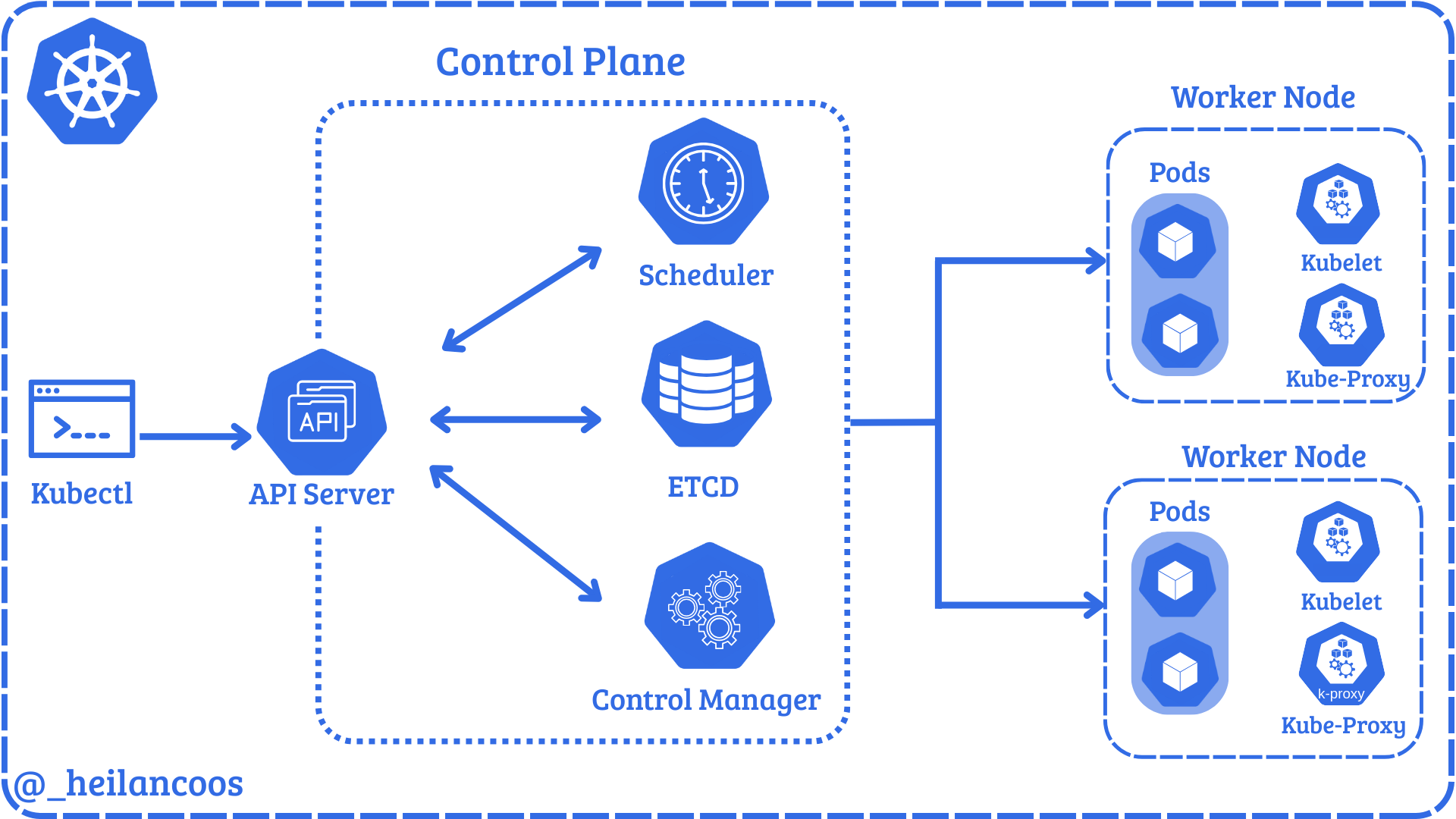
In this blog post, we are going to look at the Kubernetes agent, kubelet (see Figure 1), which is responsible for the creation of the containers inside the nodes and show how it can be...
Read More -

Learn how to protect your Kubernetes clusters against Kubelet API attacks and ensure a robust security posture.
Read More
Related rules
- Payload Execution via Shell Pipe Detected by Defend for Containers
- Suspicious Interpreter Execution Detected via Defend for Containers
- System Path File Creation and Execution Detected via Defend for Containers
- Web Server Exploitation Detected via Defend for Containers
- File Creation and Execution Detected via Defend for Containers